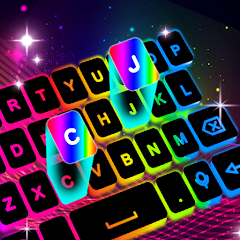
Neon LED Keyboard: RGB & Emoji

50M+
Installs
AZ Mobile Software
Developer
-
Productivity
Category
-
Rated for 3+
Content Rating
-
https://sites.google.com/view/cutewallpapersstudio
Privacy Policy
editor reviews
In the vibrant world of mobile customization, finding an app that truly lets your personality shine through your device can be a quest. Enter Neon LED Keyboard: RGB & Emoji, a dazzling creation from AZ Mobile Software that transforms your standard typing interface into a radiant light show. This isn't just another keyboard skin; it's a full-fledged sensory experience designed for those who crave color, expression, and a touch of digital flair in every message. From its pulsating neon glow to its vast library of quirky emojis and GIFs, the app promises to make typing fun again, turning mundane chats into vibrant conversations. Its development seems focused on one core principle: unrestrained personalization, allowing users to break free from the monotony of default system keyboards.
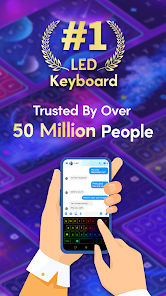
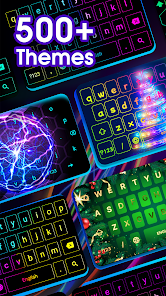
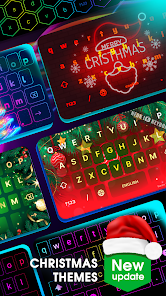
The usage experience is immediately engaging. Upon installation, you're greeted with a hub of colorful themes, from deep oceanic blues to fiery red gradients, all with that signature luminous 'neon' edge. The keyboard feels responsive, and the visual feedback—lights tracing your finger movements—adds a surprisingly satisfying layer to typing. Compared to other third-party keyboards that often prioritize function over form or become cluttered with features, Neon LED Keyboard strikes a balance. It offers substantial aesthetic customization without overwhelming the user with complex settings, making it a top choice for anyone looking to add instant pizzazz without a steep learning curve. The seamless integration of emoji and GIF search directly into the keyboard bar is a particular standout, eliminating the need to switch apps mid-conversation.
Choosing this software among a sea of alternatives boils down to its commitment to pure, joyful expression. While other keyboards might offer superior swipe-typing algorithms or more robust dictionary support, few match the sheer visual spectacle and playful spirit of this app. It understands that for many, especially in social and casual communication, how a message feels is just as important as what it says. The app doesn't try to be everything to everyone; instead, it excels brilliantly at being a fun, flashy, and highly customizable tool for self-expression. If you're tired of the same old look and want to inject some energy and color into your daily digital interactions, your search ends here. Ready to light up your chats? Head to your app store and download Neon LED Keyboard: RGB & Emoji today!
features
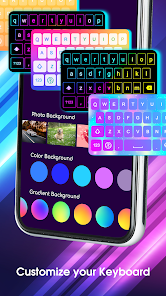
- 🌈 Vibrant Neon Themes: Choose from a massive collection of dynamic, glowing color schemes. Customize every aspect, from key colors and background gradients to the intensity and animation style of the neon glow, creating a keyboard that's uniquely yours.
- 😍 Massive Emoji & GIF Library: Access thousands of emojis, stickers, and trending GIFs directly from your keyboard. A convenient search bar lets you find the perfect reaction image in seconds, making conversations more expressive and fun.
- ✨ Live Light Trail Effects: Watch as brilliant light trails follow your fingertips across the keys with every tap. This real-time visual feedback is mesmerizing and adds a game-like, interactive quality to typing.
- 🎵 Custom Sound Packs: Personalize your auditory experience with different click sounds for each keypress. Select from futuristic beeps, classic typewriter clacks, or soft taps to match your keyboard's visual theme.
- 🔒 Privacy-Focused Design: The developer states the keyboard operates without requiring unnecessary permissions. It emphasizes on-device processing for personalized suggestions, aiming to keep your typing data secure and private.
- ⚙️ Intuitive Customization Hub: A well-organized settings menu makes personalization effortless. Adjust themes, effects, sounds, and layout options like key size and vibration with just a few taps, no technical expertise needed.
pros
- 🌟 Instant Visual Upgrade: The transformation is immediate and stunning. Your keyboard goes from a bland utility to a centerpiece of your phone's display, guaranteed to draw compliments and spark conversations.
- 🎨 Unmatched Creative Freedom: The depth of customization is impressive. You're not just picking a preset theme; you're mixing and matching elements to design a keyboard that reflects your mood, style, or even your outfit.
- 🚀 Smooth Performance: Despite the rich graphics and effects, the keyboard maintains a generally smooth and lag-free typing experience. It's responsive and doesn't feel sluggish, even on older devices.
- 😂 Enhanced Communication Toolkit: Having a vast array of emojis and GIFs at your fingertips genuinely enriches messaging. It solves the 'how do I express this?' dilemma quickly and humorously.
- 📱 Surprisingly Lightweight: For an app with so many visual assets, it remains relatively light on storage and doesn't appear to be a major drain on battery life during typical use, which is a significant plus.
- 🆓 Generous Free Offering: A wide array of themes and features are available without cost. While there are in-app purchases, the free version is fully functional and satisfying on its own.
cons
- ⚠️ Occasional Predictive Text Quirks: The autocorrect and word prediction can sometimes be less accurate than more established keyboards like Gboard or SwiftKey, leading to a few more manual corrections.
- 📛 Potential Permission Hurdles: On some Android versions, enabling a third-party keyboard requires navigating system settings, which can be confusing for less tech-savvy users. The initial setup process isn't always perfectly guided.
- 🎭 Style Over Substance for Some: If you're a power typist who values flawless prediction, extensive clipboard history, or deep integration with other apps, this keyboard's primary strength (its looks) might not fully meet your functional needs.
- 🔋 Minor Battery Consideration: While not a major drain, using the brightest neon themes with full animation and sound effects continuously will naturally consume more battery than a minimalist, static keyboard.
- 💎 Premium Theme Costs: The most exclusive and elaborate neon themes are locked behind a paywall. The free themes are great, but the best visual candy requires a purchase.
- 📲 App Integration Variability: In rare cases, the custom keyboard might not pop up correctly in every single app or game, a common issue with third-party keyboards that sometimes requires toggling back to a default option.
Articles
![]()
How to Get Robux Safely Without Scams
![]()
How to Download Older Versions of Android Apps
![]()
How to Download Games on Google Play for the First Time
![]()
What Is an APK File for Android? Everything You Need to Know
![]()
Do Free Robux Generators Work?
![]()
Robux Pricing Guide (2026 Update): How Much Robux Really Costs
![]()
How to Avoid Scams in Roblox
![]()
Rarest Pets in Adopt Me! (2026 Update)
![]()
How to Trade Safely in Adopt Me! (So You Don't Lose Everything)
![]()
Secret Tricks Nobody Tells You in 'Steal a Brainrot'
![]()
Beginner Guide: Don't Lose Your Brainrot
![]()
How to Steal in 'Steal a Brainrot' Without Getting Caught (Or at Least Not Instantly)
![]()
Is Brookhaven RP Worth Playing? It Depends on What You’re Looking For
![]()
Why Blox Fruits Is So Popular? Here’s Why Everyone Keeps Playing It
![]()
Best Roblox Obby Games for Beginners (2026): Learn the Game Without Hitting a Wall
![]()
Top 10 Roblox Horror Games (2026): The Scariest Experiences You Can't Miss
















Hot Apps
-
![]()
ChatBot - AI Chat
X PhotoKit4.5

-
![]()
Geeni
Merkury Innovations4.6 -
![]()
GroupMe
GroupMe4.5 -
![]()
PolyBuzz: Chat with AI Friends
CLOUD WHALE INTERACTIVE TECHNOLOGY LLC.3.8 -
![]()
Microsoft Teams
Microsoft Corporation4.6 -
![]()
Chai: Chat AI Platform
Chai Research Corp.4.4 -
![]()
TikTok
TikTok Pte. Ltd.4.4 -
![]()
Instagram
Instagram4.3 -
![]()
Pinterest
Pinterest4.5 -
![]()
Wise: International Transfers
Wise Payments Ltd.4.7 -
![]()
Google Maps
Google LLC4.2 -
![]()
Domino's Pizza USA
Domino's Pizza LLC4.7 -
![]()
Telegram
Telegram FZ-LLC4.2 -
![]()
SiriusXM: Music, Sports & News
SiriusXM4.6 -
![]()
Direct Express®
i2c Inc.4.3 -
![]()
Perplexity - Ask Anything
PerplexityAI4.7 -
![]()
Google Gemini
Google LLC4.6 -
![]()
Amazon Alexa
Amazon Mobile LLC4.5 -
![]()
Snapchat
Snap Inc4.1 -
![]()
MyFitnessPal: Calorie Counter
MyFitnessPal, Inc.4.3 -
![]()
Netflix
Netflix, Inc.3.9 -
![]()
Waze Navigation & Live Traffic
Waze3.9 -
![]()
YouTube
Google LLC4.1 -
![]()
Uber Eats: Food Delivery
Uber Technologies, Inc.4.3 -
![]()
Affirm: Buy now, pay over time
Affirm, Inc4.7 -
![]()
Grok
xAI4.9 -
![]()
Afterpay - Buy Now Pay Later
Afterpay3.8 -
![]()
ChatOn - AI Chat Bot Assistant
AIBY Inc.4.4 -
![]()
Spotify: Music and Podcasts
Spotify AB4.3 -
![]()
Ticketmaster-Buy, Sell Tickets
Ticketmaster L.L.C.3






























Disclaimer
1.Appinfocenter does not represent any developer, nor is it the developer of any App or game.
2.Appinfocenter provide custom reviews of Apps written by our own reviewers, and detailed information of these Apps, such as developer contacts, ratings and screenshots.
3. All trademarks, registered trademarks, brand names and company names or logos appearing on the site are the property of their respective owners.
4.Appinfocenter abides by the federal Digital Millennium Copyright Act (DMCA) by responding to notices of alleged infringement that complies with the DMCA and other applicable laws.
5.If you are the owner or copyright representative and want to delete your information, please contact us [email protected].
6.All the information on this website is strictly observed all the terms and conditions of Google Ads Advertising policies and Google Unwanted Software policy.
7.Appinfocenter.com is an independent, information-only website which is 100% free to all the users.