ThemeKit - Themes & Widgets



10M+
Installs
ThemeKit
Developer
-
Productivity
Category
-
Rated for 3+
Content Rating
-
https://doc.themekit.live/Privacy-Policy.html
Privacy Policy
editor reviews
In the bustling digital marketplace where personalization reigns supreme, ThemeKit - Themes & Widgets emerges as a formidable artisan's toolkit for iOS users. This application isn't just another icon pack generator; it's a comprehensive suite designed to transform your iPhone's home screen into a curated gallery of aesthetic delight. Developed by the aptly named ThemeKit team, the app has carved a niche for itself by focusing on depth, quality, and an intuitive user journey. My experience with the software revealed a polished ecosystem where discovering, applying, and mixing themes feels less like a technical chore and more like an engaging creative process. The development philosophy is clear: empower users with high-fidelity designs and robust widget customization without overwhelming them with complexity.
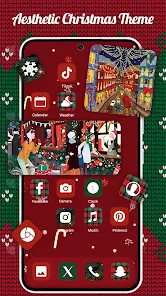
The usage experience is remarkably smooth from the outset. Upon launching ThemeKit, you're greeted with a visually rich catalog of themes, each presented with stunning previews that show exactly how your home screen will look. The process of applying a theme is refreshingly straightforward, often involving just a few taps to install a companion configuration profile and then following clear, step-by-step visual guides. What sets ThemeKit apart in a sea of similar customization apps is its commitment to cohesive design packages. Unlike platforms that offer disjointed icons and widgets, ThemeKit provides fully realized themes where icons, widgets, and wallpapers are designed in harmony. This holistic approach saves immense time and frustration, ensuring a polished final result that looks professionally assembled rather than haphazardly thrown together.
Choosing ThemeKit over its competitors boils down to its superior execution and attention to detail. While other apps might offer larger libraries, ThemeKit prioritizes quality over quantity, with each theme undergoing evident artistic scrutiny. The widget system is particularly powerful, offering deep customization options that go beyond static images to include functional elements like calendar events, battery status, and music players, all styled to match your chosen theme. The app also fosters a sense of community, featuring creations from talented designers worldwide. For anyone tired of the stock iOS look and eager to express their personality through their device, ThemeKit provides the most reliable and beautiful path forward. Ready to escape the mundane? Transform your iPhone into a personal masterpiece today—download ThemeKit and unlock a world of design possibilities! 📱🎨✨🖼️🧩🌟📲💫🔧
features
- 🎯 Cohesive Theme Packages: Each theme is a complete design ecosystem. You don't just get a set of icons; you receive matching widgets, complementary wallpapers, and sometimes even custom app folder icons, all designed to work together seamlessly for a unified aesthetic.
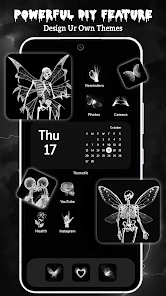
- 🛠️ Advanced Widget Studio: This built-in editor is a powerhouse. It allows you to create, resize, and layer multiple widget components on a canvas. You can adjust colors, fonts, opacity, and link data sources like weather, calendar, or reminders, giving you pixel-perfect control over your home screen's functionality and look.
- 📚 Curated Designer Catalog: The app showcases collections from renowned iOS designers. This curation ensures a high standard of quality, offering users access to professional-grade, trend-aware designs that are vetted for both visual appeal and technical execution.
- 🔗 One-Tap Setup with Profiles: ThemeKit simplifies the technically complex process of applying custom icons. It uses configuration profiles for secure, batch icon installation. With a few taps in the Settings app, your entire icon set is swapped, bypassing the need for tedious manual shortcuts for each app.
- 🎨 Dynamic & Interactive Widgets: Beyond static beauty, widgets can be interactive. You can have widgets that control music playback, display live weather updates, or show your next calendar event without opening the respective apps, blending utility with customization.
- 🔄 Regular Content Updates: The theme library is constantly refreshed with new collections aligned with seasons, holidays, and design trends. This keeps your customization options feeling fresh and exciting, encouraging you to reinvent your home screen periodically.
- 📖 Detailed Visual Tutorials: For every theme and complex widget setup, the app provides clear, image-based tutorials. These guides walk you through each step of the installation and layout process, making advanced customization accessible to beginners.
- 💾 Local Backup & Restore: You can save your custom widget creations and complete home screen layouts locally on your device. This feature is invaluable for experimenting with new looks, as you can always revert to a saved setup you love.
pros
- ✨ Exceptional Design Quality: The visual standard across all themes is consistently high. Icons are crisp, detailed, and follow a clear artistic direction within each pack, resulting in a home screen that looks meticulously crafted rather than amateurish.
- 🚀 Streamlined Application Process: The integration of configuration profiles drastically reduces the time and effort needed to apply a full icon set. What could take an hour with manual Shortcuts methods is accomplished in minutes with ThemeKit.
- 🧩 Intuitive User Interface: The app itself is a pleasure to use. Navigation is logical, previews are large and helpful, and settings are easy to find. This thoughtful UX design lowers the barrier to entry for deep iOS customization.
- ⚙️ Granular Widget Customization: The level of control in the Widget Studio is impressive. You can tweak every element to your liking, allowing for truly personalized creations that aren't possible with more rigid theme apps.
- 🆓 Strong Free Tier Offering: While a subscription unlocks the full library, the free version provides regular access to a rotating selection of complete themes and full widget functionality, allowing users to thoroughly test the app's capabilities before committing.
cons
- 💰 Subscription-Based Access Model: Full, uninterrupted access to the entire theme catalog requires a recurring subscription. Some users who prefer a one-time purchase model for perpetual access to specific themes may find this ongoing cost less appealing.
- 📱 Exclusive to iOS Ecosystem: The app is only available for iPhone users. Those in households or friend groups with mixed Android and iOS devices cannot share or use the same themes across platforms, limiting its appeal in diverse tech environments.
- 🔄 Potential for Setup Repetition: If you frequently switch between very different themes, you may need to reorganize your app layout and widget positions each time, as these placements are not always saved per theme. This can make frequent changes a bit labor-intensive.
Articles
![]()
How to Get Robux Safely Without Scams
![]()
How to Download Older Versions of Android Apps
![]()
How to Download Games on Google Play for the First Time
![]()
What Is an APK File for Android? Everything You Need to Know
![]()
Do Free Robux Generators Work?
![]()
Robux Pricing Guide (2026 Update): How Much Robux Really Costs
![]()
How to Avoid Scams in Roblox
![]()
Rarest Pets in Adopt Me! (2026 Update)
![]()
How to Trade Safely in Adopt Me! (So You Don't Lose Everything)
![]()
Secret Tricks Nobody Tells You in 'Steal a Brainrot'
![]()
Beginner Guide: Don't Lose Your Brainrot
![]()
How to Steal in 'Steal a Brainrot' Without Getting Caught (Or at Least Not Instantly)
![]()
Is Brookhaven RP Worth Playing? It Depends on What You’re Looking For
![]()
Why Blox Fruits Is So Popular? Here’s Why Everyone Keeps Playing It
![]()
Best Roblox Obby Games for Beginners (2026): Learn the Game Without Hitting a Wall
![]()
Top 10 Roblox Horror Games (2026): The Scariest Experiences You Can't Miss
















Hot Apps
-
![]()
SiriusXM: Music, Sports & News
SiriusXM4.6

-
![]()
Venmo
PayPal, Inc.4.2 -
![]()
PayPal - Send, Shop, Manage
PayPal Mobile4.3 -
![]()
TikTok
TikTok Pte. Ltd.4.4 -
![]()
GroupMe
GroupMe4.5 -
![]()
Google Maps
Google LLC4.2 -
![]()
Google Gemini
Google LLC4.6 -
![]()
Uber Eats: Food Delivery
Uber Technologies, Inc.4.3 -
![]()
Pinterest
Pinterest4.5 -
![]()
Wise: International Transfers
Wise Payments Ltd.4.7 -
![]()
YouTube
Google LLC4.1 -
![]()
Uber - Request a ride
Uber Technologies, Inc.4.6 -
![]()
Chai: Chat AI Platform
Chai Research Corp.4.4 -
![]()
GasBuddy: Find & Pay for Gas
PDI Software, Inc.3.1 -
![]()
Grok
xAI4.9 -
![]()
Signal Private Messenger
Signal Foundation4.5 -
![]()
WhatsApp Messenger
WhatsApp LLC4.2 -
![]()
Waze Navigation & Live Traffic
Waze3.9 -
![]()
PolyBuzz: Chat with AI Friends
CLOUD WHALE INTERACTIVE TECHNOLOGY LLC.3.8 -
![]()
Sora by OpenAI
OpenAI4.7 -
![]()
Instagram
Instagram4.3 -
![]()
Duolingo: Language & Chess
Duolingo4.7 -
![]()
Ticketmaster-Buy, Sell Tickets
Ticketmaster L.L.C.3 -
![]()
Snapchat
Snap Inc4.1 -
![]()
Cash App
Block, Inc.4.5 -
![]()
Netflix
Netflix, Inc.3.9 -
![]()
ChatOn - AI Chat Bot Assistant
AIBY Inc.4.4 -
![]()
Google Pay
Google LLC4.4 -
![]()
Blink Home Monitor
Immedia Semiconductor4 -
![]()
Spotify: Music and Podcasts
Spotify AB4.3






























Disclaimer
1.Appinfocenter does not represent any developer, nor is it the developer of any App or game.
2.Appinfocenter provide custom reviews of Apps written by our own reviewers, and detailed information of these Apps, such as developer contacts, ratings and screenshots.
3. All trademarks, registered trademarks, brand names and company names or logos appearing on the site are the property of their respective owners.
4.Appinfocenter abides by the federal Digital Millennium Copyright Act (DMCA) by responding to notices of alleged infringement that complies with the DMCA and other applicable laws.
5.If you are the owner or copyright representative and want to delete your information, please contact us [email protected].
6.All the information on this website is strictly observed all the terms and conditions of Google Ads Advertising policies and Google Unwanted Software policy.
7.Appinfocenter.com is an independent, information-only website which is 100% free to all the users.