Video Live Wallpaper Maker



10M+
Installs
ZipoApps
Developer
-
Productivity
Category
-
Rated for 3+
Content Rating
-
https://zipoapps.com/videowallpaper/privacy
Privacy Policy
editor reviews
In the bustling digital marketplace where personalization reigns supreme, finding a tool that genuinely transforms your device's aesthetic from static to spectacular can feel like a quest. Enter Video Live Wallpaper Maker by ZipoApps, a powerhouse application that has steadily carved its niche in the dynamic world of Android customization. This isn't just another wallpaper app; it's a creative studio that empowers users to convert any video, GIF, or even a burst of photos into a stunning, motion-filled backdrop for their home and lock screens. The journey from its initial release to its current polished state shows a developer keen on refining user experience, consistently adding features that cater to both novice enthusiasts and seasoned themers. The interface strikes a clever balance between intuitive simplicity and deep functionality, allowing you to craft breathtaking live displays without needing a degree in graphic design.
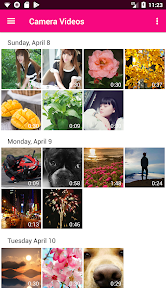
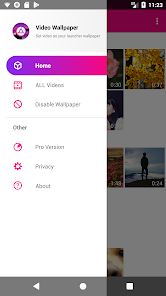
The actual usage experience is where this app truly shines and separates itself from the crowd. From the moment you launch it, you're greeted with a clean, organized layout that guides you seamlessly through the process. Choosing a source video from your gallery is effortless, and the built-in editor is surprisingly robust. You can trim clips, adjust playback speed, apply elegant visual filters, and even add a parallax depth effect that makes elements appear to move independently as you swipe between home screens. The preview function is instantaneous, letting you tweak settings in real-time until your live wallpaper looks absolutely perfect. Performance optimization is a clear priority, as the app manages to deliver smooth animation without causing significant battery drain or device lag, a common pitfall for many live wallpaper applications.
So, why choose Video Live Wallpaper Maker when the Play Store is flooded with alternatives? The answer lies in its unparalleled blend of control, quality, and reliability. While other apps might offer similar concepts, ZipoApps' solution provides a more granular level of editing, superior output stability, and a wider range of compatible video formats. It respects your device's resources while delivering maximum visual impact. Whether you want a serene loop of ocean waves, a pulsating abstract animation, or a cherished family memory playing right on your screen, this app handles it all with finesse. It transforms your phone into a living, breathing extension of your personality. Don't just settle for a static image; bring your screen to life. Download Video Live Wallpaper Maker today and start your customization adventure! 🚀🎬📱✨🎨🖼️🔥💫🌟🎇
features
- 🎯 Seamless Video Integration: The core magic lies in its ability to effortlessly convert almost any video file from your gallery into a flawless live wallpaper. It supports a vast array of formats, ensuring your favorite clips are never left out of the rotation.
- ✂️ Precision Editing Toolkit: Gone are the days of using awkward, separate apps to trim your videos. This built-in editor lets you cut clips to the exact perfect moment, adjust speed for dramatic slow-motion or fast-forward effects, and set the perfect loop point for endless, seamless playback.
- 🎨 Visual Enhancement Suite: Elevate your video with a suite of artistic filters and color adjustments. Apply vintage tones, vibrant pops of color, or monochrome styles directly within the app. The parallax scrolling option adds a stunning layer of depth, making your wallpaper interact with your home screen swipes.
- ⚙️ Performance-Focused Settings: This app puts you in the driver's seat for balancing beauty and battery life. You can set the wallpaper to play only on the home screen, lock screen, or both. Crucially, it allows pausing playback when the battery is low or the screen is off, ensuring efficiency.
- 🔄 Dynamic Multi-Wallpaper Playlists: Why settle for one? Create playlists of multiple live wallpapers and set them to rotate automatically based on a timer. Your device's look can change every hour or every day, keeping your interface feeling fresh and exciting.
- 📐 Perfect Fit & Crop Tools: No more awkwardly stretched or cropped videos. Advanced cropping and scaling tools ensure your wallpaper fits every screen dimension perfectly, whether you're using a portrait video for a landscape screen or vice versa.
pros
- 👍 Intuitive and User-Friendly Design: The interface is logically organized and incredibly easy to navigate. Even first-time users can create and set a stunning live wallpaper within minutes, thanks to clear labels and a straightforward workflow.
- 💾 Excellent Format Compatibility: It digests a wide range of video and image formats without fuss, including high-resolution files. This flexibility means you're rarely, if ever, stuck with an incompatible file.
- 🔋 Conscientious Battery Management: Unlike many live wallpaper apps that are notorious battery hogs, this one includes smart settings to minimize drain. The option to pause playback when the screen is off is a game-changer for daily use.
- 🎭 High-Quality Playback: The rendered live wallpaper maintains excellent video quality and offers buttery-smooth frame rates. The looping is cleverly handled to avoid jarring jumps, creating a truly immersive and polished look.
- 🆓 Robust Free Version: The app offers a remarkably capable free version with most core features unlocked. This allows for extensive testing and use before committing to the premium upgrade, which is reasonably priced for the value provided.
cons
- 👎 Occasional Ads in Free Version: As expected with a freemium model, the free version displays advertisements. These can sometimes interrupt the creative flow, though they are a fair trade for accessing such powerful functionality at no initial cost.
- 📶 Potential Performance on Older Devices: While optimized well, extremely resource-intensive videos (like 4K 60fps clips) might cause slight stuttering or increased battery use on older or lower-end Android devices. Sticking to 1080p or using the trim function usually resolves this.
- 🛠️ Advanced Features Behind Paywall: Some of the more premium features, like the advanced parallax effects, certain filters, and the playlist rotation function, require the one-time pro upgrade. However, the free features are substantial enough for most users' needs.
Articles
![]()
How to Get Robux Safely Without Scams
![]()
How to Download Older Versions of Android Apps
![]()
How to Download Games on Google Play for the First Time
![]()
What Is an APK File for Android? Everything You Need to Know
![]()
Do Free Robux Generators Work?
![]()
Robux Pricing Guide (2026 Update): How Much Robux Really Costs
![]()
How to Avoid Scams in Roblox
![]()
Rarest Pets in Adopt Me! (2026 Update)
![]()
How to Trade Safely in Adopt Me! (So You Don't Lose Everything)
![]()
Secret Tricks Nobody Tells You in 'Steal a Brainrot'
![]()
Beginner Guide: Don't Lose Your Brainrot
![]()
How to Steal in 'Steal a Brainrot' Without Getting Caught (Or at Least Not Instantly)
![]()
Is Brookhaven RP Worth Playing? It Depends on What You’re Looking For
![]()
Why Blox Fruits Is So Popular? Here’s Why Everyone Keeps Playing It
![]()
Best Roblox Obby Games for Beginners (2026): Learn the Game Without Hitting a Wall
![]()
Top 10 Roblox Horror Games (2026): The Scariest Experiences You Can't Miss
















Hot Apps
-
![]()
Amazon Alexa
Amazon Mobile LLC4.5

-
![]()
Netflix
Netflix, Inc.3.9 -
![]()
Waze Navigation & Live Traffic
Waze3.9 -
![]()
TikTok
TikTok Pte. Ltd.4.4 -
![]()
Hulu: Stream TV shows & movies
Disney4.5 -
![]()
Google Gemini
Google LLC4.6 -
![]()
Geeni
Merkury Innovations4.6 -
![]()
Blink Home Monitor
Immedia Semiconductor4 -
![]()
Telegram
Telegram FZ-LLC4.2 -
![]()
Zoom - One Platform to Connect
zoom.us4.1 -
![]()
Snapmint: Buy Now, Pay in EMIs
Snapmint4.5 -
![]()
Bolt: Request a Ride
Bolt Technology4.8 -
![]()
Sora by OpenAI
OpenAI4.7 -
![]()
Google Chrome: Fast & Secure
Google LLC4.1 -
![]()
Cash App
Block, Inc.4.5 -
![]()
ChatGPT
OpenAI4.7 -
![]()
GroupMe
GroupMe4.5 -
![]()
Ford™
Ford Motor Co.4.7 -
![]()
letgo: Buy & Sell Used Stuff
letgo3.3 -
![]()
Chai: Chat AI Platform
Chai Research Corp.4.4 -
![]()
Yuka - Food & cosmetic scan
Yuka App4.7 -
![]()
Amazon Fire TV
Amazon Mobile LLC4.1 -
![]()
Klarna | Shop now. Pay later.
Klarna Bank AB (publ)4.3 -
![]()
Facebook
Meta Platforms, Inc.4 -
![]()
Uber Eats: Food Delivery
Uber Technologies, Inc.4.3 -
![]()
Google Chat
Google LLC4.4 -
![]()
Duolingo: Language & Chess
Duolingo4.7 -
![]()
FaceApp: Perfect Face Editor
FaceApp Technology Ltd4.4 -
![]()
Spotify: Music and Podcasts
Spotify AB4.3 -
![]()
PayByPhone
PayByPhone Technologies Inc .4.9






























Disclaimer
1.Appinfocenter does not represent any developer, nor is it the developer of any App or game.
2.Appinfocenter provide custom reviews of Apps written by our own reviewers, and detailed information of these Apps, such as developer contacts, ratings and screenshots.
3. All trademarks, registered trademarks, brand names and company names or logos appearing on the site are the property of their respective owners.
4.Appinfocenter abides by the federal Digital Millennium Copyright Act (DMCA) by responding to notices of alleged infringement that complies with the DMCA and other applicable laws.
5.If you are the owner or copyright representative and want to delete your information, please contact us [email protected].
6.All the information on this website is strictly observed all the terms and conditions of Google Ads Advertising policies and Google Unwanted Software policy.
7.Appinfocenter.com is an independent, information-only website which is 100% free to all the users.