Ghost Photo Prank

5M+
Installs
Nachosware Prank Games
Developer
-
Entertainment
Category
-
Rated for 12+
Content Rating
-
http://freeandroidappsprank.blogspot.com.es/2013/04/privacy-policy-politica-de-privacidad.html
Privacy Policy
editor reviews
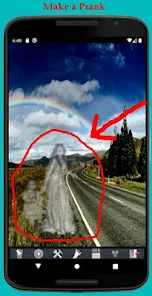
In the crowded landscape of mobile prank applications, where jump scares and fake cracks dominate, Ghost Photo Prank by Nachosware Prank Games carves out a uniquely clever and shareable niche. This app isn't about startling someone with a sudden loud noise; it's a more subtle, creative, and visually engaging tool for lighthearted mischief. The core concept is brilliantly simple yet endlessly entertaining: it allows you to superimpose realistic-looking ghostly figures, eerie shadows, or spectral anomalies into your existing photos or videos, creating convincing paranormal 'evidence' to baffle and amuse your friends and family. The experience feels less like a cheap shock and more like crafting a personalized piece of spooky folklore, making it a standout choice for those who enjoy a more narrative-driven, social kind of prank.
The development by Nachosware shows a clear understanding of its playful purpose. The interface is intuitive, requiring no technical expertise in photo editing. You simply pick a photo from your gallery or snap a new one, browse through a surprisingly diverse library of ghostly elements, and place them with a tap and pinch. The real magic lies in the rendering quality; the ghosts are designed with semi-transparency, appropriate lighting shadows, and blur effects that help them blend into the original image rather than looking like a blatant sticker. This attention to detail is what sells the prank. Over time, the app has expanded its library, adding more ghost variants, spooky visual filters, and even sound effects to enhance the final reveal, showing a commitment to keeping the content fresh for returning pranksters.
Choosing Ghost Photo Prank over similar 'scare' apps comes down to its reusability and social currency. While a fake spider app might get a one-time scream, a well-crafted ghost photo becomes a story. You can share it on social media with a cryptic caption, send it directly to a friend claiming your house is haunted, or even create a short, spooky video clip. The fun is in the reaction and the subsequent reveal that it's all a clever fake. It sparks conversation and laughter rather than just a momentary jolt. The app respects the user's creativity, acting as a tool for your imagination instead of a one-trick pony. For anyone with a mischievous streak and a love for Halloween-style fun year-round, this app delivers consistent, shareable enjoyment. Ready to become a master of the supernatural hoax? Don't wait for a ghost to photobomb you—create your own! Download Ghost Photo Prank now and start crafting your phantom tales today! 👻📱🎭😱🤪👁️🗨️📸💀👍🎉
features
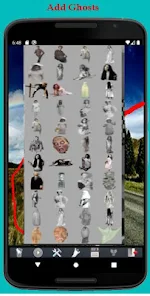
- 👻 Extensive Spectral Library: The app boasts a wide collection of ghostly apparitions, from classic white sheet figures and translucent ladies to shadowy silhouettes and glowing orbs. This variety ensures you can find the perfect spooky entity to match any photo's ambiance, whether it's a cozy living room or a dark, foreboding forest.
- 🎨 Intuitive Editing Suite: Placing and customizing your ghost is a breeze. Use simple touch gestures to resize, rotate, and position your specter. Adjust transparency levels to make the ghost appear more solid or faint, and use the flip tool for better composition. The process is designed for speed and simplicity, so you can create your prank in under a minute.
- 🎞️ Video Haunting Mode: Beyond static images, the app lets you infest your videos with paranormal activity. You can insert a ghost that remains in a fixed position within the moving frame, creating incredibly convincing clips that look like they're straight out of a found-footage horror movie. This feature significantly amplifies the prank's potential impact.
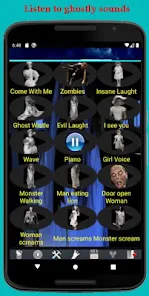
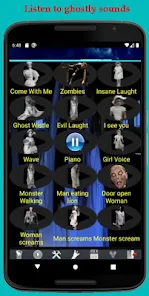
- 🔊 Eerie Sound Effects: To complete the immersive experience, the app includes a library of creepy audio clips. Add distant whispers, sudden bumps, or ghostly moans to your photos or videos. When your friend views the media with sound on, the auditory element sells the illusion completely, often leading to even more hilarious reactions.
- 🖼️ Atmospheric Photo Filters: Apply one of several spooky filters to your entire image to set the right mood. Choices may include cold blue tones, vintage sepia, dark vignettes, or a grainy 'security camera' look. These filters help tie the added ghost element seamlessly into the original photo's lighting and color palette.
- 📤 Easy Social Sharing: Once your masterpiece is complete, the app integrates seamlessly with your device's sharing menu. You can instantly send the haunted media via WhatsApp, Instagram, Facebook, or any other messaging platform. The quick-share functionality is crucial for executing the prank while the idea is still fresh and exciting.
pros
- 👍 Remarkable Realism: The standout strength is how convincingly the ghost assets blend into photos. The developers have paid excellent attention to details like matching light sources and adding natural blur, which prevents the additions from looking like obvious, poorly cut-out PNG files. This realism is the core of the app's effectiveness.
- 😄 Universal, Harmless Fun: This prank is universally accessible and rarely causes genuine distress. It leads to laughter, curiosity, and playful accusations rather than fear or anger. It's a fantastic icebreaker for parties or a fun way to engage with friends and family online, making it a socially positive form of mischief.
- 💡 Fuels Creativity: The app acts as a creative tool, encouraging users to think about scene setting, storytelling, and comedic timing. You're not just pressing a button; you're directing a tiny, spooky scene. This creative aspect gives the app lasting appeal beyond a single use.
- 🚀 Quick and Simple Workflow: From selecting a photo to exporting the final result, the process is incredibly fast. There's no complex learning curve, lengthy rendering times, or confusing menus. This simplicity means you can create and share a prank on the fly, capitalizing on spontaneous ideas.
- 🆓 Strong Free Offering: The app provides a robust set of features and a good selection of ghosts and filters at no cost. This allows users to fully test the app's potential and enjoy numerous pranks without feeling pressured to make an immediate purchase, which builds goodwill and demonstrates the app's value.
cons
- 👎 Advertisements Can Be Intrusive: Like many free apps, it is supported by video and banner ads. These can interrupt the creative flow, appearing between selecting features or when exporting. While understandable, the frequency and placement can sometimes detract from the smooth, quick experience the app otherwise offers.
- 🔒 Premium Content Behind Paywall: The most unique and visually impressive ghosts, filters, and sound effects are typically locked in a 'Pro' version or require individual purchases. The free library, while decent, may feel limited after repeated use, pushing enthusiastic users toward in-app transactions.
- 🔄 Occasional App Stability: Some users on older devices or certain operating systems report occasional crashes, especially when working with high-resolution photos or using multiple editing features in sequence. These bugs are not universal but can be frustrating when they occur mid-creation.
- 📱 Device Compatibility Variances: The final rendered quality of the ghost in the photo can look slightly different depending on your phone's screen resolution and graphics processor. On some devices, the blending might appear less seamless than on others, which can affect the prank's credibility.
- 🎬 Video Editing Limitations: While the video feature is great, its editing capabilities are more basic compared to the photo mode. You often have less control over the ghost's properties within the video timeline, and processing longer clips can be slow or may result in reduced output quality.
Articles
![]()
How to Get Robux Safely Without Scams
![]()
How to Download Older Versions of Android Apps
![]()
How to Download Games on Google Play for the First Time
![]()
What Is an APK File for Android? Everything You Need to Know
![]()
Do Free Robux Generators Work?
![]()
Robux Pricing Guide (2026 Update): How Much Robux Really Costs
![]()
How to Avoid Scams in Roblox
![]()
Rarest Pets in Adopt Me! (2026 Update)
![]()
How to Trade Safely in Adopt Me! (So You Don't Lose Everything)
![]()
Secret Tricks Nobody Tells You in 'Steal a Brainrot'
![]()
Beginner Guide: Don't Lose Your Brainrot
![]()
How to Steal in 'Steal a Brainrot' Without Getting Caught (Or at Least Not Instantly)
![]()
Is Brookhaven RP Worth Playing? It Depends on What You’re Looking For
![]()
Why Blox Fruits Is So Popular? Here’s Why Everyone Keeps Playing It
![]()
Best Roblox Obby Games for Beginners (2026): Learn the Game Without Hitting a Wall
![]()
Top 10 Roblox Horror Games (2026): The Scariest Experiences You Can't Miss
















Hot Apps
-
![]()
Waze Navigation & Live Traffic
Waze3.9

-
![]()
Afterpay - Buy Now Pay Later
Afterpay3.8 -
![]()
Yuka - Food & cosmetic scan
Yuka App4.7 -
![]()
Passport Parking
Passport Labs, Inc.2.5 -
![]()
letgo: Buy & Sell Used Stuff
letgo3.3 -
![]()
Microsoft Teams
Microsoft Corporation4.6 -
![]()
Cash App
Block, Inc.4.5 -
![]()
Google Maps
Google LLC4.2 -
![]()
TikTok
TikTok Pte. Ltd.4.4 -
![]()
Sora by OpenAI
OpenAI4.7 -
![]()
Domino's Pizza USA
Domino's Pizza LLC4.7 -
![]()
Affirm: Buy now, pay over time
Affirm, Inc4.7 -
![]()
Venmo
PayPal, Inc.4.2 -
![]()
PolyBuzz: Chat with AI Friends
CLOUD WHALE INTERACTIVE TECHNOLOGY LLC.3.8 -
![]()
Zoom - One Platform to Connect
zoom.us4.1 -
![]()
Pandora - Music & Podcasts
Pandora4.1 -
![]()
Netflix
Netflix, Inc.3.9 -
![]()
Uber Eats: Food Delivery
Uber Technologies, Inc.4.3 -
![]()
Google Home
Google LLC4.2 -
![]()
Spotify: Music and Podcasts
Spotify AB4.3 -
![]()
Pinterest
Pinterest4.5 -
![]()
ParkMobile: Park. Pay. Go.
Parkmobile, LLC4.3 -
![]()
ChatOn - AI Chat Bot Assistant
AIBY Inc.4.4 -
![]()
Bolt: Request a Ride
Bolt Technology4.8 -
![]()
DoorDash - Food Delivery
DoorDash4.6 -
![]()
Amazon Fire TV
Amazon Mobile LLC4.1 -
![]()
Google Chrome: Fast & Secure
Google LLC4.1 -
![]()
Blink Home Monitor
Immedia Semiconductor4 -
![]()
Signal Private Messenger
Signal Foundation4.5 -
![]()
Duolingo: Language & Chess
Duolingo4.7






























Disclaimer
1.Appinfocenter does not represent any developer, nor is it the developer of any App or game.
2.Appinfocenter provide custom reviews of Apps written by our own reviewers, and detailed information of these Apps, such as developer contacts, ratings and screenshots.
3. All trademarks, registered trademarks, brand names and company names or logos appearing on the site are the property of their respective owners.
4.Appinfocenter abides by the federal Digital Millennium Copyright Act (DMCA) by responding to notices of alleged infringement that complies with the DMCA and other applicable laws.
5.If you are the owner or copyright representative and want to delete your information, please contact us [email protected].
6.All the information on this website is strictly observed all the terms and conditions of Google Ads Advertising policies and Google Unwanted Software policy.
7.Appinfocenter.com is an independent, information-only website which is 100% free to all the users.