DIY Emoji - Sticker Maker

1M+
Installs
Braly JSC
Developer
-
Productivity
Category
-
Rated for 3+
Content Rating
-
https://bralyvn.com/privacy-policy.php
Privacy Policy
editor reviews
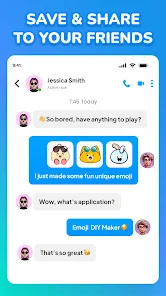
In the bustling digital marketplace where personal expression reigns supreme, DIY Emoji - Sticker Maker emerges as a vibrant playground for creativity. This app, developed by Braly JSC, transforms your smartphone into a personalized sticker factory, empowering you to craft unique emojis and stickers directly from your photos. The concept brilliantly bridges the gap between generic emoji keyboards and deeply personal digital communication. Instead of scrolling endlessly for an emoji that almost fits your mood, you can now create one that captures it perfectly, whether it's your face on a dancing pineapple or your pet's smirk on a superhero's body. The development focus is clearly on user-friendly tools, making advanced graphic design accessible to everyone without needing a degree in Photoshop. My usage experience felt like unlocking a new layer of texting—suddenly, my group chats were filled with inside jokes visualized through custom stickers, making conversations more dynamic, personal, and hilariously specific. 🎨📱✨😄🌟💡🖼️🤳🎭
Choosing DIY Emoji over similar sticker creators isn't a difficult decision when you examine its offering. Many competitors either offer simplistic tools with limited editing capabilities or complex interfaces that overwhelm casual users. DIY Emoji strikes a masterful balance. It provides a surprisingly robust set of features—from precise cut-out tools and a rich library of accessories to flexible text options and animation effects—all wrapped in an intuitive interface that feels inviting rather than intimidating. The process is seamless: snap a photo, trace the outline, decorate, and share. It empowers a level of customization that feels truly personal, moving beyond pre-set filters and templates. The ability to instantly use your creations in any messaging app elevates it from a mere novelty to a genuine utility for daily communication. For anyone tired of the same old emojis and yearning to inject their personality into every "LOL" and "BRB," this app is the definitive tool. 🏆🤩🔧📲💬🎉🚀❤️👍
The sheer joy of seeing a friend react to a sticker you made from their own awkward photo is priceless. DIY Emoji - Sticker Maker doesn't just create stickers; it fosters a new, more engaging form of interaction. It turns mundane chats into memorable exchanges and allows your digital persona to be as unique as your fingerprint. The app continuously evolves, with the developers seemingly in tune with user desires for more elements and sharing options. From creating reaction memes for your family group to designing branded stickers for a small business, the possibilities are wonderfully endless. If you're ready to upgrade your messaging game from passive consumer to active creator, to express yourself with unparalleled originality, then your next step is clear. Don't just send another message—define it. Download DIY Emoji - Sticker Maker today and let your creativity become the message! 📥👇😍🤯💥🌍🎊🔥✅
features
- 🎭 Personalized Avatars: Transform any photo into a expressive emoji avatar. Use the smart cut-out tool to isolate faces or objects, then place them on a variety of body templates or shapes to create your digital doppelganger.
- 🛠️ Advanced Editing Suite: Access a comprehensive set of editing tools including brushes for fine-detail erasing, smoothing edges for a clean look, and adjustment sliders for brightness and contrast to perfect your base image.
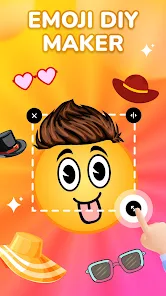
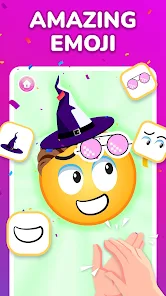
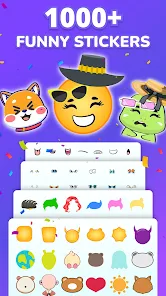
- 🎨 Vast Decoration Library: Deck out your creations with hundreds of free accessories. Choose from hats, glasses, mustaches, crowns, and quirky items like floating pizzas or sparkle effects to add character and humor.
- ✏️ Dynamic Text & Fonts: Add captions and speech bubbles with a wide selection of fonts, colors, and outlines. Make your stickers speak literally with funny phrases or labels that complete the joke.
- 🌀 Animation & Effects: Bring static stickers to life with simple animation tools. Add wobble, spin, or bounce effects to make your creations stand out in any chat window with eye-catching movement.
- 📤 One-Tap Sharing: Export and share your masterpieces effortlessly. The app integrates directly with your keyboard, allowing you to use custom stickers instantly in WhatsApp, iMessage, Instagram, and more.
- 📂 Organized Sticker Packs: Save and manage your creations into custom-named packs. Keep your 'Family Memes' separate from your 'Work Reactions' for quick and organized access during any conversation.
- 🆓 Free Core Features: Enjoy the fundamental creative tools without spending a dime. A substantial amount of content and functionality is available for free, making creativity accessible from the first download.
pros
- 🚀 Intuitive User Journey: The app guides you from photo to finished sticker with remarkable clarity. The workflow is logical, tools are well-labeled, and the learning curve is practically non-existent, making it enjoyable for all ages.
- 💎 High-Quality Output: Despite the simple process, the final stickers maintain good resolution and clean edges. They look crisp and professional when sent, avoiding the pixelated, low-quality look of some DIY tools.
- 🎪 Boundless Creative Freedom: The combination of tools and elements genuinely allows for limitless ideas. You're not confined to a few templates; you can create anything from a simple smiling coffee cup to an elaborate animated scene.
- 🔗 Seamless App Integration: Once added to your keyboard, your sticker packs appear like any native emoji set. The frictionless shift from creation to application in real chats is a major technical and practical win.
- 😄 Pure Fun Factor: Using the app is genuinely entertaining. Experimenting with different combinations and anticipating friends' reactions adds a layer of joy to the messaging experience that standard emojis lack.
cons
- ⚠️ Persistent Advertisements: The free version is supported by frequent video and banner ads, which can interrupt the creative flow. While understandable, their placement can sometimes feel intrusive during the editing process.
- 🔒 Premium Paywall for Best Items: The most attractive accessories, advanced animations, and special font packs are locked behind a one-time purchase or subscription. This can feel limiting once you've exhausted the free elements.
- ✂️ Auto-Cut Precision Quirks: The automatic background removal tool is handy but can struggle with complex edges like frizzy hair or detailed objects. Manual correction is often needed for a perfect cut-out, requiring extra patience.
- 📱 Occasional Performance Hiccups: When working with high-resolution photos or applying multiple complex effects, the app can sometimes lag or stutter slightly, especially on older device models.
Articles
![]()
How to Get Robux Safely Without Scams
![]()
How to Download Older Versions of Android Apps
![]()
How to Download Games on Google Play for the First Time
![]()
What Is an APK File for Android? Everything You Need to Know
![]()
Do Free Robux Generators Work?
![]()
Robux Pricing Guide (2026 Update): How Much Robux Really Costs
![]()
How to Avoid Scams in Roblox
![]()
Rarest Pets in Adopt Me! (2026 Update)
![]()
How to Trade Safely in Adopt Me! (So You Don't Lose Everything)
![]()
Secret Tricks Nobody Tells You in 'Steal a Brainrot'
![]()
Beginner Guide: Don't Lose Your Brainrot
![]()
How to Steal in 'Steal a Brainrot' Without Getting Caught (Or at Least Not Instantly)
![]()
Is Brookhaven RP Worth Playing? It Depends on What You’re Looking For
![]()
Why Blox Fruits Is So Popular? Here’s Why Everyone Keeps Playing It
![]()
Best Roblox Obby Games for Beginners (2026): Learn the Game Without Hitting a Wall
![]()
Top 10 Roblox Horror Games (2026): The Scariest Experiences You Can't Miss
















Hot Apps
-
![]()
PayPal - Send, Shop, Manage
PayPal Mobile4.3
-
![]()
Affirm: Buy now, pay over time
Affirm, Inc4.7
-
![]()
Ford™
Ford Motor Co.4.7 -
![]()
PolyBuzz: Chat with AI Friends
CLOUD WHALE INTERACTIVE TECHNOLOGY LLC.3.8 -
![]()
DoorDash - Food Delivery
DoorDash4.6 -
![]()
Venmo
PayPal, Inc.4.2 -
![]()
Amazon Fire TV
Amazon Mobile LLC4.1 -
![]()
Pandora - Music & Podcasts
Pandora4.1 -
![]()
ChatGPT
OpenAI4.7 -
![]()
Ticketmaster-Buy, Sell Tickets
Ticketmaster L.L.C.3 -
![]()
TikTok
TikTok Pte. Ltd.4.4 -
![]()
Microsoft Copilot
Microsoft Corporation4.8 -
![]()
Perplexity - Ask Anything
PerplexityAI4.7 -
![]()
Pinterest
Pinterest4.5 -
![]()
ParkMobile: Park. Pay. Go.
Parkmobile, LLC4.3 -
![]()
Domino's Pizza USA
Domino's Pizza LLC4.7 -
![]()
Uber Eats: Food Delivery
Uber Technologies, Inc.4.3 -
![]()
Bolt: Request a Ride
Bolt Technology4.8 -
![]()
GasBuddy: Find & Pay for Gas
PDI Software, Inc.3.1 -
![]()
Grok
xAI4.9 -
![]()
MyFitnessPal: Calorie Counter
MyFitnessPal, Inc.4.3 -
![]()
Geeni
Merkury Innovations4.6 -
![]()
Zoom - One Platform to Connect
zoom.us4.1 -
![]()
letgo: Buy & Sell Used Stuff
letgo3.3 -
![]()
Google Chat
Google LLC4.4 -
![]()
Signal Private Messenger
Signal Foundation4.5 -
![]()
Instagram
Instagram4.3 -
![]()
Duolingo: Language & Chess
Duolingo4.7 -
![]()
FaceApp: Perfect Face Editor
FaceApp Technology Ltd4.4 -
![]()
Facebook
Meta Platforms, Inc.4






























Disclaimer
1.Appinfocenter does not represent any developer, nor is it the developer of any App or game.
2.Appinfocenter provide custom reviews of Apps written by our own reviewers, and detailed information of these Apps, such as developer contacts, ratings and screenshots.
3. All trademarks, registered trademarks, product names and company names or logos appearing on the site are the property of their respective owners.
4.Appinfocenter abides by the federal Digital Millennium Copyright Act (DMCA) by responding to notices of alleged infringement that complies with the DMCA and other applicable laws.
5.If you are the owner or copyright representative and want to delete your information, please contact us [email protected].
6.All the information on this website is strictly observed all the terms and conditions of Google Ads Advertising policies and Google Unwanted Software policy.
7.Appinfocenter.com is an independent, information-only website which is 100% free to all the users.