
PixVerse: AI Video Generator





50M+
Installs
PixVerse
Developer
-
Generative AI
Category
-
Teen
Content Rating
-
https://docs.pixverse.ai/Privacy-Policy-97a21aaf01f646ad968e8f6a0e1a2400
Privacy Policy
editor reviews
PixVerse: AI Video Generator has carved out a serious niche for itself in the fast-moving world of AI content creation, and honestly, it feels like the hidden gem of the scene. I stumbled upon it after burning through dozens of other tools that either demanded a kidney in subscription fees or spat out videos that looked like they were rendered by a potato. What hooked me from the get-go was its incredibly low barrier to entry. You can literally type a sentence, click generate, and within minutes watch a smooth, cinematic clip materialize out of thin air. The learning curve is basically flat, which is a godsend for someone like me who has zero patience for complicated node-based editors or rendering pipelines. It is not just about making videos, it is about making them look intentional and polished, and PixVerse manages to pull that off without making you feel like you need a computer science degree.
When I compare it to the big names like Runway or Pika, PixVerse holds its own in some surprising ways. While the others often lock their best features behind paywalls or force you into a credits system that drains faster than a leaky bucket, PixVerse gives you a generous free tier that actually lets you experiment and learn. The community aspect is also huge here. There is a built-in feed where you can watch what other creators are making, remix their prompts, and even build on their ideas directly. That social layer transforms the app from a solo utility into a collaborative playground. I have found myself spending hours just scrolling through the creations, stealing inspiration, and then tweaking those concepts into my own projects. It is addictive in the best possible way, and it directly fed into my reason for sticking with this app: the combination of accessibility, active community, and genuinely impressive output quality makes it feel like the smartest choice for both beginners and jaded pros.
My personal usage journey has been a rollercoaster of delight and occasional frustration, but the wins far outweigh the stumbles. I have made everything from moody anime-style rain scenes for my podcast backgrounds to vibrant, hyper-realistic product shots for a friend's online store, and the results often shocked me with their coherence and detail. The motion is fluid, the lighting obeys the prompts, and even the weird, hallucinatory errors that plague AI video are less frequent here. It has become my go-to brainstorming tool, my rapid prototyping machine, and my source of endless late-night creative procrastination. If you have ever wanted to see your wildest imagined scenes come to life without spending a fortune or pulling your hair out over complex software, then this is your ticket. I cannot recommend it enough. Stop hesitating and download PixVerse today, because the only thing standing between you and your next masterpiece is a single tap.
features
- 🚀 Instant Text-to-Video Magic: This is the core engine. You type a prompt, and the AI interprets it into a coherent, multi-second clip with surprising narrative logic. It handles complex scenes, character interactions, and even subtle background shifts that most rivals struggle with.
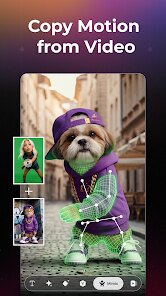
- 🎨 Style Transfer Superpowers: Forget just making realistic videos. PixVerse lets you rip styles from reference images, so you can take a photo of your dog and turn it into a cyberpunk samurai in a neon-lit alley. The style lock feature is freakishly accurate, preserving colors and textures flawlessly.
- 📱 Mobile-First Design Done Right: The interface is buttery smooth on a phone. All the sliders, prompt boxes, and preview players are thumb-friendly. You can start a render on your commute and check on it during your lunch break. The mobile app is not a stripped-down web wrapper; it is a full-featured native experience.
- 👥 Social Remix and Share Hub: There is a vibrant, integrated feed where users showcase their wildest creations. You can directly "remix" someone else's video with your own twist, which creates an incredible feedback loop of inspiration and iteration. It is the TikTok of AI videos built right into the app.
- ⏱️ Lightning-Fast Rendering Queue: The processing speed is genuinely impressive. A standard 4K clip can be generated in under five minutes during off-peak hours, even on the free tier. The queue system is transparent, showing you exactly where you stand, and you can pause or cancel tasks with zero penalties.
- 🔧 A/B Prompt Testing Tool: This is a pro-level feature hidden in the advanced settings. You can simultaneously generate two versions of the same prompt with minor variations, letting you quickly compare different lighting setups or camera angles side-by-side. It is perfect for nailing the exact shot you want.
pros
- 🎯 Generous Free Tier That Actually Works: I cannot stress this enough. Most AI video apps give you 3 free credits and then demand cash. PixVerse hands you a daily allowance that lets you produce several quality clips every single day. This is fantastic for learning the ropes without any financial commitment.
- 🧠 Prompt Inspiration Built-In: When you have creator's block, the app's browse section is a lifesaver. It shows you trending prompts and their outputs, complete with the exact text used. You can copy, modify, and execute in seconds. It turns a blank page into a launchpad for creativity.
- ⚡ Stable Performance on Mid-Range Hardware: Unlike some tools that require a beefy GPU on your local machine, PixVerse does all the heavy lifting in the cloud. My mid-tier laptop and even my older tablet handle the app with no lag or overheating. The processing never drains your device battery.
- 👌 Minimal Clipping or Distortion in Most Scenes: The AI handles object continuity well. Faces stay recognizable, animals keep their limbs, and background objects do not warp into eldritch horrors as often as they do with other generators. The motion smoothing is exceptionally clean.
- 🔄 Effortless Export and Share Options: The app integrates directly with your phone's gallery and major social platforms. You can export in standard MP4 with adjustable resolution or frame rate, and there is a one-tap button to upload straight to TikTok or Instagram Reels with the hashtags already formatted.
cons
- 🚫 Limited Control Over Camera Paths: While you can specify "zoomed in" or "dolly shot", you cannot manually define a complex camera trajectory with keyframes. For a specific 3D tracking move or a car chase with a rotating camera, you will hit a wall and have to rely on luck.
- 💾 No Local Rendering Option: If your internet connection is spotty or you are in a data dead zone, you are out of luck. Since everything is cloud-based, the app is completely useless offline. A download-and-preview feature for unfinished projects would be a massive improvement.
- 🔊 Canned Audio Mixing: The built-in sound effects are generic and often do not match the subtle environmental audio you requested. You can upload a music track, but the AI does not intelligently sync it with the video's action or emotional beats. You will still need a separate editor for sound design.
- ⌛ Peak Hour Queue Overload: During prime evening hours, the free tier render queue can stretch to 30 minutes or longer. While the speed is usually great, the inconsistency is annoying. You might wait 5 minutes for a clip, and then 45 minutes for the exact same prompt an hour later.
- 🧩 Occasional Prompt Overgeneralization: If your prompt is too vague, the AI tends to default to a "cinematic slow-motion" look for everything. This means action scenes might come out feeling overly dramatic or slow, and you have to fight against that default by adding very specific speed and energy keywords.
Articles
![]()
How to Get Robux Safely Without Scams
![]()
How to Download Older Versions of Android Apps
![]()
How to Download Games on Google Play for the First Time
![]()
What Is an APK File for Android? Everything You Need to Know
![]()
Do Free Robux Generators Work?
![]()
Robux Pricing Guide (2026 Update): How Much Robux Really Costs
![]()
How to Avoid Scams in Roblox
![]()
Rarest Pets in Adopt Me! (2026 Update)
![]()
How to Trade Safely in Adopt Me! (So You Don't Lose Everything)
![]()
Secret Tricks Nobody Tells You in 'Steal a Brainrot'
![]()
Beginner Guide: Don't Lose Your Brainrot
![]()
How to Steal in 'Steal a Brainrot' Without Getting Caught (Or at Least Not Instantly)
![]()
Is Brookhaven RP Worth Playing? It Depends on What You’re Looking For
![]()
Why Blox Fruits Is So Popular? Here’s Why Everyone Keeps Playing It
![]()
Best Roblox Obby Games for Beginners (2026): Learn the Game Without Hitting a Wall
![]()
Top 10 Roblox Horror Games (2026): The Scariest Experiences You Can't Miss












Hot Apps
-
![]()
Geeni
Merkury Innovations4.6

-
![]()
Signal Private Messenger
Signal Foundation4.5 -
![]()
GroupMe
GroupMe4.5 -
![]()
PolyBuzz: Chat with AI Friends
CLOUD WHALE INTERACTIVE TECHNOLOGY LLC.3.8 -
![]()
MyFitnessPal: Calorie Counter
MyFitnessPal, Inc.4.3 -
![]()
Google Pay
Google LLC4.4 -
![]()
Instagram
Instagram4.3 -
![]()
Domino's Pizza USA
Domino's Pizza LLC4.7 -
![]()
Google Chrome: Fast & Secure
Google LLC4.1 -
![]()
Facebook
Meta Platforms, Inc.4 -
![]()
Chai: Chat AI Platform
Chai Research Corp.4.4 -
![]()
ParkMobile: Park. Pay. Go.
Parkmobile, LLC4.3 -
![]()
ChatOn - AI Chat Bot Assistant
AIBY Inc.4.4 -
![]()
FaceApp: Perfect Face Editor
FaceApp Technology Ltd4.4 -
![]()
Grok
xAI4.9 -
![]()
letgo: Buy & Sell Used Stuff
letgo3.3 -
![]()
Pinterest
Pinterest4.5 -
![]()
Snapmint: Buy Now, Pay in EMIs
Snapmint4.5 -
![]()
Google Chat
Google LLC4.4 -
![]()
YouTube
Google LLC4.1 -
![]()
CapCut - Video Editor
Bytedance Pte. Ltd.4 -
![]()
TikTok
TikTok Pte. Ltd.4.4 -
![]()
Blink Home Monitor
Immedia Semiconductor4 -
![]()
Perplexity - Ask Anything
PerplexityAI4.7 -
![]()
Wise: International Transfers
Wise Payments Ltd.4.7 -
![]()
Sora by OpenAI
OpenAI4.7 -
![]()
DoorDash - Food Delivery
DoorDash4.6 -
![]()
Microsoft Copilot
Microsoft Corporation4.8 -
![]()
Hulu: Stream TV shows & movies
Disney4.5 -
![]()
Bolt: Request a Ride
Bolt Technology4.8






























Disclaimer
1.Appinfocenter does not represent any developer, nor is it the developer of any App or game.
2.Appinfocenter provide custom reviews of Apps written by our own reviewers, and detailed information of these Apps, such as developer contacts, ratings and screenshots.
3. All trademarks, registered trademarks, brand names and company names or logos appearing on the site are the property of their respective owners.
4.Appinfocenter abides by the federal Digital Millennium Copyright Act (DMCA) by responding to notices of alleged infringement that complies with the DMCA and other applicable laws.
5.If you are the owner or copyright representative and want to delete your information, please contact us [email protected].
6.All the information on this website is strictly observed all the terms and conditions of Google Ads Advertising policies and Google Unwanted Software policy.
7.Appinfocenter.com is an independent, information-only website which is 100% free to all the users.