DIY Pixel Art Idea ASMR




5M+
Installs
NEXCOSMO
Developer
-
Puzzle
Category
-
Everyone
Content Rating
-
https://sites.google.com/nexcosmo.net/64-642-8152-privacy-policy
Privacy Policy
editor reviews
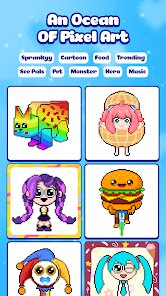
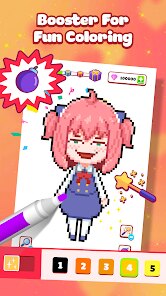
DIY Pixel Art Idea ASMR, developed by NEXCOSMO, is a unique fusion of a creative sandbox and a sensory relaxation tool. At its core, it's a pixel art editor where you place colorful blocks on a grid to create images, accompanied by the satisfying, crisp sounds of each placement—a hallmark of ASMR (Autonomous Sensory Meridian Response) content. It belongs to a niche genre blending casual creativity with audio-visual therapy. This game is perfect for players looking to unwind, fans of digital art and pixel aesthetics, or anyone who finds the repetitive sounds of clicking and placing blocks oddly calming. What initially caught my attention was the promise of this specific combination; the market is full of pixel art apps and ASMR videos, but rarely are they merged into an interactive, game-like experience. The clean, simple visuals in the promotional material suggested a focused, distraction-free environment ideal for both creativity and relaxation.
Jumping in, the experience is immediately accessible and soothing. The controls are intuitive—tap or drag to place pixels, with a color palette that's easy to navigate. Performance is smooth, with no lag, which is crucial for maintaining the relaxing flow. The learning curve is practically non-existent; you can start creating within seconds. What truly stood out and exceeded my expectations was the audio design. The subtle, varied sounds for selecting colors, placing blocks, and even erasing are incredibly crisp and satisfying. There was a moment, while meticulously filling in a large section of a sky, where the rhythmic tap-tap-tap combined with the emerging image created a genuinely hypnotic and productive trance. The immersion is primarily driven by this audio-visual feedback loop. The UI is minimalist, putting the canvas front and center, though the progression system feels almost absent—it's more of a pure tool than a game with goals or unlocks, which affects longevity for goal-oriented players. A trick that enhanced my experience was using the app with headphones to fully appreciate the nuanced ASMR sounds, turning a simple drawing session into a deeply calming ritual.
As someone who has tried numerous digital art apps and relaxation games, from Zen Bound to Happy Color, I kept returning to DIY Pixel Art Idea ASMR for its singular, focused purpose. It doesn't try to be a full-featured art suite like Procreate, nor does it layer on artificial game mechanics. It does one thing exceptionally well: providing a seamless, sensory-rich pixel art canvas. It stands out in its niche by fully committing to the ASMR aspect, making the act of creation as calming as the result. For me, it worked because it offered a genuine digital detox—a few minutes of focused, simple creativity with immediate audio-visual rewards, without any ads, aggressive monetization, or social pressure. While it may not have the depth to stand out in the broader "game" category, within its specific fusion of creativity and ASMR, it executes its vision with impressive polish and effectiveness.
features
- Intuitive Pixel Canvas 🎨: A simple, grid-based canvas where you tap or drag to place or erase individual pixels. A sidebar offers a scrollable color palette for instant selection.
- ASMR Sound Design 🔊: Every action, from picking a color to placing a block, generates a distinct, satisfying sound. These range from soft clicks to subtle crunches, designed to trigger relaxing ASMR responses.
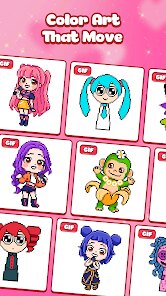
- Idea Gallery & Templates 💡: A built-in gallery provides pixel art templates and ideas for inspiration, ranging from simple objects like fruit to more complex scenes, helping overcome creative block.
- Basic Sharing Tools 📤: Functionality to save your completed pixel art to your device's gallery or share it directly to other social apps, though integration is fairly standard.
- Minimalist User Interface 🖥️: A clean, clutter-free interface with essential tools like color picker, eraser, and canvas clear, ensuring the focus remains on creation and relaxation.
pros
- The Perfect Sensory Blend 🧠: The seamless integration of tactile visual creation with intentional, high-quality sound design is masterful. It transforms a simple activity into a deeply immersive and calming experience that genuinely works for stress relief.
- Zero-Pressure Creativity 🕊️: With no timers, scores, in-app purchases, or mandatory ads, the environment is completely pressure-free. It's a pure digital sandbox that encourages experimentation without any fear of failure.
- Instant Accessibility ⚡: The app launches quickly and gets you into the creative flow within seconds. The immediate understanding of the mechanics means anyone, regardless of age or gaming experience, can enjoy it right away.
cons
- Limited Long-Term Engagement 🔄: As a pure tool, it lacks goals, challenges, or a progression system. After you've tried the templates, motivation to return can wane unless you're highly self-driven in your pixel art projects.
- Basic Feature Set 🛠️: Missing are common art app features like layers, undo/redo beyond one step, custom color palettes, or different brush sizes. This limits its utility for more serious or complex pixel art creation.
- Passive Idea Gallery 🖼️: The provided ideas are static templates. It would be more engaging if the gallery offered daily challenges, community submissions, or step-by-step tutorials to learn new techniques and drive regular use.
Articles
![]()
How to Get Robux Safely Without Scams
![]()
How to Download Older Versions of Android Apps
![]()
How to Download Games on Google Play for the First Time
![]()
What Is an APK File for Android? Everything You Need to Know
![]()
Do Free Robux Generators Work?
![]()
Robux Pricing Guide (2026 Update): How Much Robux Really Costs
![]()
How to Avoid Scams in Roblox
![]()
Rarest Pets in Adopt Me! (2026 Update)
![]()
How to Trade Safely in Adopt Me! (So You Don't Lose Everything)
![]()
Secret Tricks Nobody Tells You in 'Steal a Brainrot'
![]()
Beginner Guide: Don't Lose Your Brainrot
![]()
How to Steal in 'Steal a Brainrot' Without Getting Caught (Or at Least Not Instantly)
![]()
Is Brookhaven RP Worth Playing? It Depends on What You’re Looking For
![]()
Why Blox Fruits Is So Popular? Here’s Why Everyone Keeps Playing It
![]()
Best Roblox Obby Games for Beginners (2026): Learn the Game Without Hitting a Wall
![]()
Top 10 Roblox Horror Games (2026): The Scariest Experiences You Can't Miss
















Hot Apps
-
![]()
TikTok
TikTok Pte. Ltd.4.4
-
![]()
Google Chat
Google LLC4.4 -
![]()
Amazon Fire TV
Amazon Mobile LLC4.1 -
![]()
Klarna | Shop now. Pay later.
Klarna Bank AB (publ)4.3 -
![]()
YouTube
Google LLC4.1 -
![]()
TikTok
TikTok Pte. Ltd.4.4 -
![]()
SiriusXM: Music, Sports & News
SiriusXM4.6
-
![]()
FaceApp: Perfect Face Editor
FaceApp Technology Ltd4.4 -
![]()
Direct Express®
i2c Inc.4.3 -
![]()
Ford™
Ford Motor Co.4.7 -
![]()
Instagram
Instagram4.3 -
![]()
Google Home
Google LLC4.2 -
![]()
GasBuddy: Find & Pay for Gas
PDI Software, Inc.3.1 -
![]()
MyFitnessPal: Calorie Counter
MyFitnessPal, Inc.4.3 -
![]()
GroupMe
GroupMe4.5 -
![]()
ParkMobile: Park. Pay. Go.
Parkmobile, LLC4.3 -
![]()
Snapmint: Buy Now, Pay in EMIs
Snapmint4.5 -
![]()
Sora by OpenAI
OpenAI4.7 -
![]()
Signal Private Messenger
Signal Foundation4.5 -
![]()
Google Pay
Google LLC4.4 -
![]()
Microsoft Teams
Microsoft Corporation4.6 -
![]()
Zoom - One Platform to Connect
zoom.us4.1 -
![]()
Cash App
Block, Inc.4.5 -
![]()
Spotify: Music and Podcasts
Spotify AB4.3 -
![]()
Telegram
Telegram FZ-LLC4.2 -
![]()
Netflix
Netflix, Inc.3.9 -
![]()
Grok
xAI4.9 -
![]()
Duolingo: Language & Chess
Duolingo4.7 -
![]()
PolyBuzz: Chat with AI Friends
CLOUD WHALE INTERACTIVE TECHNOLOGY LLC.3.8 -
![]()
Microsoft Copilot
Microsoft Corporation4.8






























Disclaimer
1.Appinfocenter does not represent any developer, nor is it the developer of any App or game.
2.Appinfocenter provide custom reviews of Apps written by our own reviewers, and detailed information of these Apps, such as developer contacts, ratings and screenshots.
3. All trademarks, registered trademarks, brand names and company names or logos appearing on the site are the property of their respective owners.
4.Appinfocenter abides by the federal Digital Millennium Copyright Act (DMCA) by responding to notices of alleged infringement that complies with the DMCA and other applicable laws.
5.If you are the owner or copyright representative and want to delete your information, please contact us [email protected].
6.All the information on this website is strictly observed all the terms and conditions of Google Ads Advertising policies and Google Unwanted Software policy.
7.Appinfocenter.com is an independent, information-only website which is 100% free to all the users.