AR Draw Sketch - Trace & Paint


5K+
Installs
MØ Studios
Developer
-
Art & Design
Category
-
Everyone
Content Rating
-
https://sites.google.com/view/mostudios/privacy-policy
Privacy Policy
editor reviews
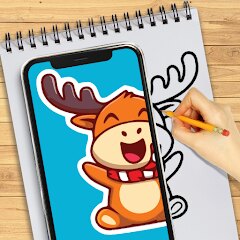
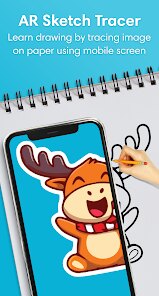
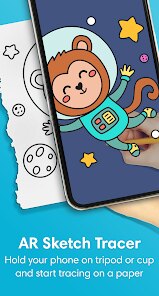
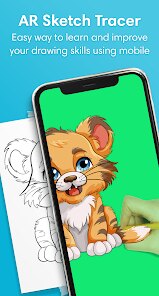
AR Draw Sketch - Trace & Paint is a mobile app that uses your device's camera to help you trace images onto paper. It was first launched in 2021 by MØ Studios. You can find it on the Google Play Store for Android and the App Store for iOS devices. The app has been downloaded over 10 million times on the Google Play Store alone. It is free to download and use, which is great. You do not need to create an account or register to start using it. There are some in-app purchases available if you want to unlock extra features or remove ads. The app does have some ads, but they are not too annoying and do not get in the way of your work.
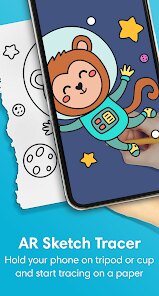
Using the app is pretty simple. You pick an image from your gallery or take a new photo. The app shows the image on your screen with the camera view behind it. You place your paper in the camera's view, and you can see the lines of the image through the paper. You then trace the lines with a pencil or pen. One tip I have is to make sure you have good lighting when you use it. The app works best when the lighting is even, so your camera can clearly see the paper and the image. Also, try to keep your phone steady. Using a phone stand or a tripod makes a big difference because it keeps the image from moving while you trace.
I have tried a few other tracing apps like SketchAR and Tracing Projector. But I keep coming back to this one. The main reason I choose AR Draw Sketch over those other apps is that it feels much more straightforward to use. SketchAR has a lot of features that I just don't need, and it can feel a bit cluttered. Tracing Projector works fine, but the free version is very limited. With AR Draw Sketch, I can get started right away without dealing with too many menus or locked features. The free version gives you enough to do most of what you want. For a beginner or just someone who wants to trace a picture for fun, this app is a solid choice.
features
- 🔦 Super Simple Lock-On: The app has a feature that locks the image on your paper. Even if you move your phone a little, the image stays in place. Other apps like SketchAR make you re-adjust the image a lot. This lock-on feature makes the whole tracing process so much smoother and less frustrating.
- 🎨 Wide Image Library: You are not just stuck with your own photos. The app has a built-in library of images you can use. There are coloring pages, sketches, and different styles to choose from. This is great for when you want to draw something but don't have a picture ready.
- 🔄 Adjustable Transparency: You can change how see-through the image is on your screen. This is helpful because you can see the paper and your pencil lines better. Some apps do not let you control this, so the image is too dark or too bright. This app gives you a slider to get it just right.
- 📸 Easy Projection: The app projects the image onto your camera view very clearly. It uses the camera well, so you can see the outlines perfectly. Other tracing apps sometimes have a blurry or unclear projection, which makes it hard to trace accurately.
pros
- 👑 Completely Free Core Use: Unlike many similar apps that force you to pay for basic tracing, this app lets you trace any image you want for free. Tracing Projector, for example, locks most of its good features behind a paywall. This app is much more generous with its free features.
- ⚡ No Registration Required: I hate apps that make me sign up or create an account just to try them out. AR Draw Sketch lets you download and start using it immediately. This is a big win over some other apps that ask for your email or social media login right away.
- 🤝 Active Developer Support: The MØ Studios team seems to update the app regularly based on user feedback. The app works well on most Android and iOS devices. I have not had major crashing issues, which is more than I can say for some other tracing apps I have tried.
cons
- 📱 Camera Quality Dependent: The app's performance is heavily tied to your phone's camera. If you have an older phone with a poor camera, the tracing will not be as clear or accurate. Apps that are less camera-dependent, like SketchAR, might work better on lower-end devices.
- 📖 Limited Editing Tools: You cannot edit the image inside the app. You cannot change colors, crop, or adjust the brightness of the source image. You have to do that before you bring it into the app. Some users might miss having basic editing tools right there.
- 🔋 Battery Drainer: Using the camera for a long time drains your phone's battery pretty fast. If you plan on tracing for a long session, you will need to have your charger ready. This is a common problem with AR apps, but it is still a weakness worth mentioning.
- 💰 Ads and In-App Purchases: While the free version is good, the ads can be a bit repetitive. And while you do not need to pay to use the core feature, some of the nicer image packs or no-ads options are behind a paywall. It is not a big deal, but it is something to keep in mind.
Articles
![]()
How to Get Robux Safely Without Scams
![]()
How to Download Older Versions of Android Apps
![]()
How to Download Games on Google Play for the First Time
![]()
What Is an APK File for Android? Everything You Need to Know
![]()
Do Free Robux Generators Work?
![]()
Robux Pricing Guide (2026 Update): How Much Robux Really Costs
![]()
How to Avoid Scams in Roblox
![]()
Rarest Pets in Adopt Me! (2026 Update)
![]()
How to Trade Safely in Adopt Me! (So You Don't Lose Everything)
![]()
Secret Tricks Nobody Tells You in 'Steal a Brainrot'
![]()
Beginner Guide: Don't Lose Your Brainrot
![]()
How to Steal in 'Steal a Brainrot' Without Getting Caught (Or at Least Not Instantly)
![]()
Is Brookhaven RP Worth Playing? It Depends on What You’re Looking For
![]()
Why Blox Fruits Is So Popular? Here’s Why Everyone Keeps Playing It
![]()
Best Roblox Obby Games for Beginners (2026): Learn the Game Without Hitting a Wall
![]()
Top 10 Roblox Horror Games (2026): The Scariest Experiences You Can't Miss
















Hot Apps
-
![]()
Cash App
Block, Inc.4.5

-
![]()
Afterpay - Buy Now Pay Later
Afterpay3.8 -
![]()
Waze Navigation & Live Traffic
Waze3.9 -
![]()
YouTube
Google LLC4.1 -
![]()
ChatGPT
OpenAI4.7 -
![]()
Geeni
Merkury Innovations4.6 -
![]()
WhatsApp Messenger
WhatsApp LLC4.2 -
![]()
Uber - Request a ride
Uber Technologies, Inc.4.6 -
![]()
Grok
xAI4.9 -
![]()
Amazon Fire TV
Amazon Mobile LLC4.1 -
![]()
Snapchat
Snap Inc4.1 -
![]()
ChatOn - AI Chat Bot Assistant
AIBY Inc.4.4 -
![]()
Google Home
Google LLC4.2 -
![]()
Ford™
Ford Motor Co.4.7 -
![]()
Hulu: Stream TV shows & movies
Disney4.5 -
![]()
Pandora - Music & Podcasts
Pandora4.1 -
![]()
Affirm: Buy now, pay over time
Affirm, Inc4.7 -
![]()
Uber Eats: Food Delivery
Uber Technologies, Inc.4.3 -
![]()
OfferUp: Buy. Sell. Letgo.
OfferUp Inc.4.4 -
![]()
DoorDash - Food Delivery
DoorDash4.6 -
![]()
CapCut - Video Editor
Bytedance Pte. Ltd.4 -
![]()
Pinterest
Pinterest4.5 -
![]()
Wise: International Transfers
Wise Payments Ltd.4.7 -
![]()
ParkMobile: Park. Pay. Go.
Parkmobile, LLC4.3 -
![]()
Chai: Chat AI Platform
Chai Research Corp.4.4 -
![]()
Zoom - One Platform to Connect
zoom.us4.1 -
![]()
MyFitnessPal: Calorie Counter
MyFitnessPal, Inc.4.3 -
![]()
Google Pay
Google LLC4.4 -
![]()
GasBuddy: Find & Pay for Gas
PDI Software, Inc.3.1 -
![]()
Microsoft Teams
Microsoft Corporation4.6






























Disclaimer
1.Appinfocenter does not represent any developer, nor is it the developer of any App or game.
2.Appinfocenter provide custom reviews of Apps written by our own reviewers, and detailed information of these Apps, such as developer contacts, ratings and screenshots.
3. All trademarks, registered trademarks, brand names and company names or logos appearing on the site are the property of their respective owners.
4.Appinfocenter abides by the federal Digital Millennium Copyright Act (DMCA) by responding to notices of alleged infringement that complies with the DMCA and other applicable laws.
5.If you are the owner or copyright representative and want to delete your information, please contact us [email protected].
6.All the information on this website is strictly observed all the terms and conditions of Google Ads Advertising policies and Google Unwanted Software policy.
7.Appinfocenter.com is an independent, information-only website which is 100% free to all the users.