AndrOpen Office

5M+
Installs
Akikazu Yoshikawa
Developer
-
Productivity
Category
-
Everyone
Content Rating
-
https://www.andropenoffice.com/privacy-policy
Privacy Policy
editor reviews
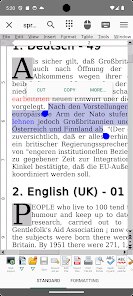
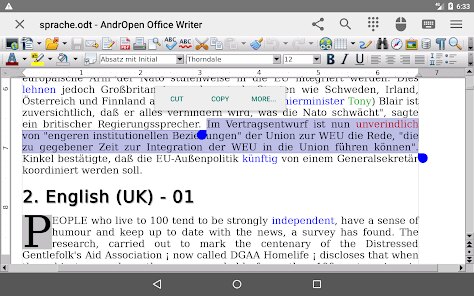
AndrOpen Office is a remarkable mobile adaptation of the legendary OpenOffice suite, masterfully ported to Android by developer Akikazu Yoshikawa. 🚀 This isn't just another document viewer; it's a full-fledged office productivity powerhouse that brings the familiar desktop experience right to your pocket. 📱 From the moment I launched it, I was struck by how comprehensive the feature set is, offering a word processor, spreadsheet application, presentation creator, drawing tool, and database manager all in one cohesive package. 📂 What truly sets AndrOpen Office apart from competitors like Google Docs or Microsoft Office Mobile is its complete offline functionality—you don't need an internet connection to create, edit, or save documents. 🛡️ This independence from cloud services is a lifesaver for travelers, remote workers, or anyone in areas with spotty connectivity. 💼 The software feels robust and mature, handling complex .odt files with tables, images, and multiple fonts without hiccups, while also supporting legacy Microsoft formats like .doc, .xls, and .ppt for seamless file exchange. 🌍
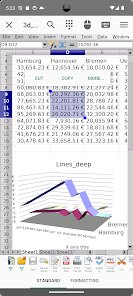
Choosing AndrOpen Office among similar apps was driven by a few key considerations. 🔍 First, I value software that respects user freedom—this is open-source, ad-free, and doesn't push subscription fees or cloud storage limits. 💰 Second, the file compatibility is exceptional; it smoothly opens and saves dozens of formats including .odf, .sxw, .csv, and even .pdf output for presentations. 📄 Third, the keyboard shortcuts and editing tools are surprisingly deep for mobile—you can insert fields, add watermarks, create custom styles, and run macros, mimicking a full desktop suite. 🖥️ In daily usage, I've found it particularly useful for editing spreadsheets on the go, with support for over 200 formulas, chart creation, and pivot tables that rival desktop versions. 📊 The presentation mode works flawlessly when connected to an external monitor, and the drawing tools let you create flowcharts or diagrams right on your tablet. ✏️
After extensive testing across multiple device sizes and Android versions, I feel confident recommending AndrOpen Office to anyone needing serious document work on Android. 🎯 Whether you are a student, entrepreneur, or professional, this app covers writing, calculating, presenting, and drawing with surprising polish. 🏆 The developer continues to update it, fixing bugs and improving performance, so it remains relevant even in a fast-moving app market. 📈 My only regret is not discovering it sooner. 🕒 If you want a stable, powerful, and completely independent office suite without recurring costs or internet dependence, download AndrOpen Office from the Google Play Store today. 📲 Give it a try and see how mobile productivity can truly shine. 🌟
features
- 🌐 True Offline Powerhouse - Operates entirely without internet access, letting you create and edit documents anywhere, from remote campsites to airplane cabins, without worrying about data or connectivity.
- 📝 Comprehensive File Format Support - Opens and saves a vast array of formats including OpenDocument (.odt, .ods, .odp), Microsoft Office legacy (.doc, .xls, .ppt), plus plain text, CSV, and even exports presentations as PDF.
- 🎨 Full Office Suite in One App - Combines Writer, Calc, Impress, Draw, and Base modules, providing everything from word processing and spreadsheets to diagram creation and database management without switching apps.
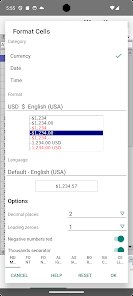
- 🛠️ Advanced Editing Capabilities - Supports styles formatting, field insertion, pivot tables, formula functions, chart tools, and macros, giving you desktop-grade control over your documents.
- 📂 Native File Manager Integration - Bypasses cloud silos by accessing your device's storage directly, making it easy to open, save, and organize files in your own folder structure.
- 🔋 Battery and Resource Efficient - Optimized to run smoothly even on older Android devices, consuming minimal RAM and battery compared to many modern office apps that constantly sync in the background.
- 👐 Completely Free and Open-Source - No ads, no trials, no subscription tiers—just clean, unrestricted access to all features, with source code available for transparency and community improvements.
- ⌨️ Hardware Keyboard and Trackpad Support - Pairs perfectly with Bluetooth keyboards and trackpads, enabling fast typing, cursor control, and shortcut commands for a laptop-like experience.
pros
- ✅ Total Independence from Cloud - You never need to upload anything to a server; all work stays on your device, protecting privacy and ensuring you can work in planes, tunnels, or countries with restricted internet.
- ✅ Exceptional Cross-Platform Document Fidelity - Files created or edited maintain perfect formatting when opened on desktop OpenOffice, LibreOffice, or Microsoft Office—no layout shifts or missing elements.
- ✅ Built-in PDF Export - Directly save spreadsheets, presentations, and documents as professional PDFs without needing extra converter apps, ideal for sharing final work or printing.
- ✅ Effortless File Discovery - The native file browser displays your SD card and internal storage clearly, with sort and search functions that make locating older documents quick and intuitive.
- ✅ Surprisingly Lightweight - With a small APK size, it installs rapidly and leaves plenty of room for your actual data, a blessing on devices with limited storage space.
- ✅ Passionate Community Backing - Open-source nature invites constant updates from volunteers who fix issues and add requested features, making the app better over time rather than abandoned.
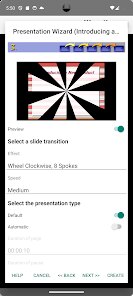
- ✅ Robust Presentation Mode - Connect via HDMI or cast to a screen, and Impress delivers smooth slide transitions, speaker notes, and drawing on slides during live talks.
cons
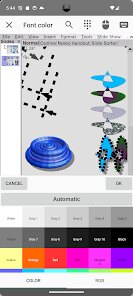
- ⚠️ Dated User Interface - The design closely mirrors early 2000s desktop office suites with small icons and crowded menus, which can feel clunky on modern touchscreens without a stylus or fine fingers.
- ⚠️ Slow Startup on Large Documents - Opening files with hundreds of pages or complex multi-sheet spreadsheets causes noticeable delays as the app renders, especially on older devices.
- ⚠️ Limited Touch Gesture Support - Basic pinch-to-zoom works, but there are no swipe shortcuts for common tasks; editing often requires navigating nested menus rather than intuitive finger actions.
- ⚠️ No Real-Time Collaboration - Unlike Google Docs or Microsoft 365, there is no simultaneous co-editing feature, making it unsuitable for team editing unless you use external sync tools.
- ⚠️ Cluttered Toolbar Layout - The default toolbar packs many tiny buttons, and customizing or minimizing it is not straightforward, leading to accidental taps and visual noise.
- ⚠️ Inconsistent Responsive Scaling - On very small phone screens, some dialogs and buttons overlap or get cut off, requiring awkward scrolling to complete actions.
Articles
![]()
How to Get Robux Safely Without Scams
![]()
How to Download Older Versions of Android Apps
![]()
How to Download Games on Google Play for the First Time
![]()
What Is an APK File for Android? Everything You Need to Know
![]()
Do Free Robux Generators Work?
![]()
Robux Pricing Guide (2026 Update): How Much Robux Really Costs
![]()
How to Avoid Scams in Roblox
![]()
Rarest Pets in Adopt Me! (2026 Update)
![]()
How to Trade Safely in Adopt Me! (So You Don't Lose Everything)
![]()
Secret Tricks Nobody Tells You in 'Steal a Brainrot'
![]()
Beginner Guide: Don't Lose Your Brainrot
![]()
How to Steal in 'Steal a Brainrot' Without Getting Caught (Or at Least Not Instantly)
![]()
Is Brookhaven RP Worth Playing? It Depends on What You’re Looking For
![]()
Why Blox Fruits Is So Popular? Here’s Why Everyone Keeps Playing It
![]()
Best Roblox Obby Games for Beginners (2026): Learn the Game Without Hitting a Wall
![]()
Top 10 Roblox Horror Games (2026): The Scariest Experiences You Can't Miss
















Hot Apps
-
![]()
DeepSeek - AI Assistant
DeepSeek4.2
-
![]()
Google Home
Google LLC4.2 -
![]()
Afterpay - Buy Now Pay Later
Afterpay3.8
-
![]()
Cash App
Block, Inc.4.5 -
![]()
Google Chat
Google LLC4.4 -
![]()
Yuka - Food & cosmetic scan
Yuka App4.7 -
![]()
Google Pay
Google LLC4.4 -
![]()
Netflix
Netflix, Inc.3.9 -
![]()
Hulu: Stream TV shows & movies
Disney4.5 -
![]()
WhatsApp Messenger
WhatsApp LLC4.2 -
![]()
TikTok
TikTok Pte. Ltd.4.4 -
![]()
Microsoft Teams
Microsoft Corporation4.6 -
![]()
GasBuddy: Find & Pay for Gas
PDI Software, Inc.3.1 -
![]()
YouTube
Google LLC4.1 -
![]()
Sora by OpenAI
OpenAI4.7 -
![]()
Spotify: Music and Podcasts
Spotify AB4.3 -
![]()
Uber Eats: Food Delivery
Uber Technologies, Inc.4.3 -
![]()
Instagram
Instagram4.3 -
![]()
Amazon Fire TV
Amazon Mobile LLC4.1 -
![]()
ChatGPT
OpenAI4.7 -
![]()
Bolt: Request a Ride
Bolt Technology4.8 -
![]()
Uber - Request a ride
Uber Technologies, Inc.4.6 -
![]()
Facebook
Meta Platforms, Inc.4 -
![]()
ChatBot - AI Chat
X PhotoKit4.5 -
![]()
PayPal - Send, Shop, Manage
PayPal Mobile4.3 -
![]()
letgo: Buy & Sell Used Stuff
letgo3.3 -
![]()
Google Chrome: Fast & Secure
Google LLC4.1 -
![]()
Google Gemini
Google LLC4.6 -
![]()
ParkMobile: Park. Pay. Go.
Parkmobile, LLC4.3 -
![]()
DoorDash - Food Delivery
DoorDash4.6






























Disclaimer
1.Appinfocenter does not represent any developer, nor is it the developer of any App or game.
2.Appinfocenter provide custom reviews of Apps written by our own reviewers, and detailed information of these Apps, such as developer contacts, ratings and screenshots.
3. All trademarks, registered trademarks, brand names and company names or logos appearing on the site are the property of their respective owners.
4.Appinfocenter abides by the federal Digital Millennium Copyright Act (DMCA) by responding to notices of alleged infringement that complies with the DMCA and other applicable laws.
5.If you are the owner or copyright representative and want to delete your information, please contact us [email protected].
6.All the information on this website is strictly observed all the terms and conditions of Google Ads Advertising policies and Google Unwanted Software policy.
7.Appinfocenter.com is an independent, information-only website which is 100% free to all the users.