Skin Editor 3D for Minecraft

10M+
Installs
Remoro Studios
Developer
-
Productivity
Category
-
Rated for 3+
Content Rating
-
http://remoro-studios.com/privacy_policy
Privacy Policy
editor reviews
In the vibrant and endlessly creative universe of Minecraft, personal expression through unique character skins stands as a cornerstone of the player experience. 🎨✨ For years, crafting that perfect skin—a pixel-perfect representation of your in-game persona—required either significant artistic skill with basic editors or reliance on pre-made designs from online libraries. Enter Skin Editor 3D for Minecraft by Remoro Studios, a powerful application that fundamentally transforms this creative process. This app isn't just another simple skin picker; it's a comprehensive, intuitive, and three-dimensional studio designed to empower every player, from complete beginners to seasoned pixel artists, to build, customize, and animate their dream skins with unprecedented ease and depth. 🖌️🔥 Its development clearly focuses on bridging the gap between complex creation tools and user-friendly accessibility, making professional-grade skin design available at your fingertips.
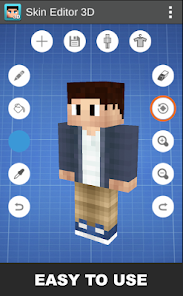
The usage experience from the moment you launch Skin Editor 3D is remarkably smooth and inviting. 🚀💡 The interface is clean, logically organized, and leverages the full potential of touchscreen devices with intuitive gestures for rotating, zooming, and editing your 3D model. Unlike flat, confusing 2D skin editors that require mental mapping of pixels to body parts, this app presents your Minecraft character in a live, rotatable 3D view. You paint directly on the model, and the changes are instantly visible from every angle, eliminating guesswork and fostering a truly immersive design session. 🧑🎨🌈 The tactile feel of drawing on a three-dimensional figure makes the creative process not only more accurate but also significantly more enjoyable and engaging, turning skin creation from a chore into a delightful hobby.
Choosing Skin Editor 3D over other similar software is a decision driven by its unparalleled blend of power and simplicity. 🏆⚡ While other apps might offer extensive libraries or basic editing, Remoro Studios' solution provides a full-fledged creation suite. It stands out for its robust feature set—including advanced layers, symmetry tools, animation capabilities, and a vast import/export ecosystem—all wrapped in a package that feels approachable. 🧩🌟 Whether you aim to recreate a favorite character, design an original hero, or simply tweak an existing skin with personal flair, this app provides all the necessary tools without overwhelming the user. It respects your creativity and gives it the space to flourish. Ready to stop browsing and start building your iconic Minecraft identity? Don't just wear a skin; define one. Download Skin Editor 3D today and unleash your inner digital fashion designer! 📲🎭
features
- 🎯 Live 3D Editing Canvas: The core of the app is its interactive 3D model of the Minecraft character. You can rotate, zoom, and pan around the figure, painting and editing directly on its surface. This real-time, perspective-accurate editing is a game-changer, making it easy to visualize how your design wraps around the character's form without any confusing flat templates.
- 🧱 Advanced Layer System: Work with multiple layers to add complexity and non-destructive edits to your skin. This feature allows you to separate elements like clothing, armor, tattoos, or effects onto different layers, enabling you to modify, hide, or adjust them independently without affecting the base skin, much like professional graphic design software.
- ⚖️ Smart Symmetry Tools: Perfect for creating balanced designs, the symmetry tools automatically mirror your strokes across the X or Y axis. Painting one arm or leg instantly applies the same pattern to the other, ensuring perfect alignment and saving an immense amount of time and effort during the design process.
- 🎬 Frame-by-Frame Animation Studio: Go beyond static skins and bring your character to life. This module allows you to create animated skins by setting keyframes for different poses or texture changes. You can design subtle movements like flowing capes, blinking eyes, or glowing effects, adding a dynamic layer of personality to your Minecraft avatar.
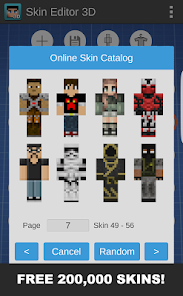
- 📚 Vast Template & Community Library: Jumpstart your creativity with a built-in library containing hundreds of pre-made skin templates, categorized for easy browsing. Furthermore, you can access and download countless creations shared by the app's global community, providing endless inspiration and ready-to-use designs.
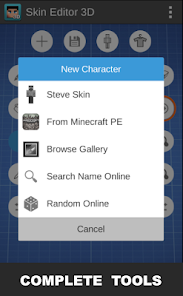
- 🔀 Seamless Import & Export: The app seamlessly integrates with your Minecraft experience. You can import any skin image from your device or the web to edit. Once your masterpiece is complete, exporting it directly to your Minecraft game or saving it to your gallery is a process of just one or two taps, ensuring your creation is ready to use instantly.
- 🛠️ Precision Editing Tools: A full suite of editing tools is at your disposal, including a color picker, fill bucket, brush with adjustable size and opacity, eraser, and pixel-perfect drawing mode. These tools offer the granular control needed for detailed work, from broad color fills to intricate pixel art details.
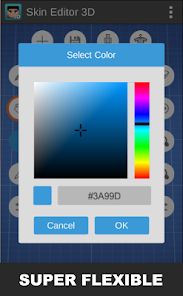
- 🎨 Rich Color Palette & Effects: Choose from an extensive color wheel and pre-saved palettes to find the exact shade you need. Additional effects like shading, highlighting, and texture overlays can be applied to add depth and realism to your skin, making it pop in the game world.
pros
- 🌟 Intuitive and Immersive Interface: The app's design is a masterclass in user experience. Navigating between tools, layers, and the 3D model feels natural. The direct, tactile connection of drawing on a 3D object makes the creative process incredibly engaging and far less abstract than traditional 2D editors.
- 🚀 Powerful Features for All Skill Levels: It successfully caters to a wide audience. Beginners can start with templates and simple edits, while advanced users can dive deep into layers, animation, and precision tools. This scalability means the app grows with your skill, remaining useful and challenging over time.
- 💾 Excellent Community and Sharing Ecosystem: The integrated community library is not just a feature; it's a thriving hub of inspiration. The ability to share your own creations and explore others' work fosters a creative loop that constantly provides new ideas and celebrates user-generated content.
- ⏱️ Massive Time-Saver with Symmetry and Layers: The symmetry mode alone cuts design time in half for symmetrical characters. Combined with the layer system for non-destructive editing, these features streamline the workflow dramatically, allowing you to experiment freely without fear of making irreversible mistakes.
- 📤 Flawless Game Integration: The export process is brilliantly simple and reliable. Transferring your finished skin into Minecraft (Bedrock Edition) works without a hitch, removing the technical friction that often accompanies custom content and letting you enjoy your creation in-game immediately.
cons
- ⚠️ Primarily Tailored for Bedrock Edition: The app's most direct export and integration functions are optimized for Minecraft Bedrock Edition (Windows 10, Mobile, Console). Java Edition users can still create and export skins, but the process to apply them involves manual file management, which is less streamlined.
- 🔄 Animation Learning Curve: While the animation studio is a phenomenal feature, it has a steeper learning curve compared to the static editing tools. New users might find the frame-based system and timeline controls somewhat complex to master without consulting tutorials or guides.
- 📱 Performance on Older Devices: The 3D rendering and live editing canvas are resource-intensive. On older smartphones or tablets, you might experience occasional lag, slower response times, or the app may become slightly warm during prolonged, detailed editing sessions, potentially affecting the smoothness of the experience.
Articles
![]()
How to Get Robux Safely Without Scams
![]()
How to Download Older Versions of Android Apps
![]()
How to Download Games on Google Play for the First Time
![]()
What Is an APK File for Android? Everything You Need to Know
![]()
Do Free Robux Generators Work?
![]()
Robux Pricing Guide (2026 Update): How Much Robux Really Costs
![]()
How to Avoid Scams in Roblox
![]()
Rarest Pets in Adopt Me! (2026 Update)
![]()
How to Trade Safely in Adopt Me! (So You Don't Lose Everything)
![]()
Secret Tricks Nobody Tells You in 'Steal a Brainrot'
![]()
Beginner Guide: Don't Lose Your Brainrot
![]()
How to Steal in 'Steal a Brainrot' Without Getting Caught (Or at Least Not Instantly)
![]()
Is Brookhaven RP Worth Playing? It Depends on What You’re Looking For
![]()
Why Blox Fruits Is So Popular? Here’s Why Everyone Keeps Playing It
![]()
Best Roblox Obby Games for Beginners (2026): Learn the Game Without Hitting a Wall
![]()
Top 10 Roblox Horror Games (2026): The Scariest Experiences You Can't Miss
















Hot Apps
-
![]()
Bolt: Request a Ride
Bolt Technology4.8

-
![]()
TikTok
TikTok Pte. Ltd.4.4 -
![]()
Microsoft Copilot
Microsoft Corporation4.8 -
![]()
DoorDash - Food Delivery
DoorDash4.6 -
![]()
Hulu: Stream TV shows & movies
Disney4.5 -
![]()
Netflix
Netflix, Inc.3.9 -
![]()
Passport Parking
Passport Labs, Inc.2.5 -
![]()
Signal Private Messenger
Signal Foundation4.5 -
![]()
Ford™
Ford Motor Co.4.7 -
![]()
Blink Home Monitor
Immedia Semiconductor4 -
![]()
Zoom - One Platform to Connect
zoom.us4.1 -
![]()
Microsoft Teams
Microsoft Corporation4.6 -
![]()
Perplexity - Ask Anything
PerplexityAI4.7 -
![]()
ChatGPT
OpenAI4.7 -
![]()
Facebook
Meta Platforms, Inc.4 -
![]()
PayByPhone
PayByPhone Technologies Inc .4.9 -
![]()
Ticketmaster-Buy, Sell Tickets
Ticketmaster L.L.C.3 -
![]()
PayPal - Send, Shop, Manage
PayPal Mobile4.3 -
![]()
Telegram
Telegram FZ-LLC4.2 -
![]()
CapCut - Video Editor
Bytedance Pte. Ltd.4 -
![]()
Cash App
Block, Inc.4.5 -
![]()
TikTok
TikTok Pte. Ltd.4.4 -
![]()
Uber Eats: Food Delivery
Uber Technologies, Inc.4.3 -
![]()
Google Chrome: Fast & Secure
Google LLC4.1 -
![]()
GroupMe
GroupMe4.5 -
![]()
Pandora - Music & Podcasts
Pandora4.1 -
![]()
PolyBuzz: Chat with AI Friends
CLOUD WHALE INTERACTIVE TECHNOLOGY LLC.3.8 -
![]()
ParkMobile: Park. Pay. Go.
Parkmobile, LLC4.3 -
![]()
Direct Express®
i2c Inc.4.3 -
![]()
OfferUp: Buy. Sell. Letgo.
OfferUp Inc.4.4






























Disclaimer
1.Appinfocenter does not represent any developer, nor is it the developer of any App or game.
2.Appinfocenter provide custom reviews of Apps written by our own reviewers, and detailed information of these Apps, such as developer contacts, ratings and screenshots.
3. All trademarks, registered trademarks, product names and company names or logos appearing on the site are the property of their respective owners.
4.Appinfocenter abides by the federal Digital Millennium Copyright Act (DMCA) by responding to notices of alleged infringement that complies with the DMCA and other applicable laws.
5.If you are the owner or copyright representative and want to delete your information, please contact us [email protected].
6.All the information on this website is strictly observed all the terms and conditions of Google Ads Advertising policies and Google Unwanted Software policy.
7.Appinfocenter.com is an independent, information-only website which is 100% free to all the users.